Hello,
Icons from import-facebook-events plugin also affect EventON:
https://events.my-kohphangan.com/wp-content/plugins/import-facebook-events/assets/css/font-awesome.min.css?ver=1.7.4
Basically all of them have been replaced.
featured events not showing up
Are you referring to Tags: Moved Online, Virtual Event?
https://www.myeventon.com/wp-content/themes/AJDE/images/_2023/main.png
1. Client details:
2. Order ID: 174702
- reminders- single site
- event tickets- single site
- bookings- single site
3. email: tessa@theloyaltyco.app
4.
- Order Id : 175871
- add ons purchased: dynamic pricing single site
I solved it!! I deleted all events and created new ones.
Hello
I just wanted to make sure if, from now on, every time when I update the eventon plugin I need to to this import/export? But the setting was no change in the past while I didn’t do this procedure before updating.
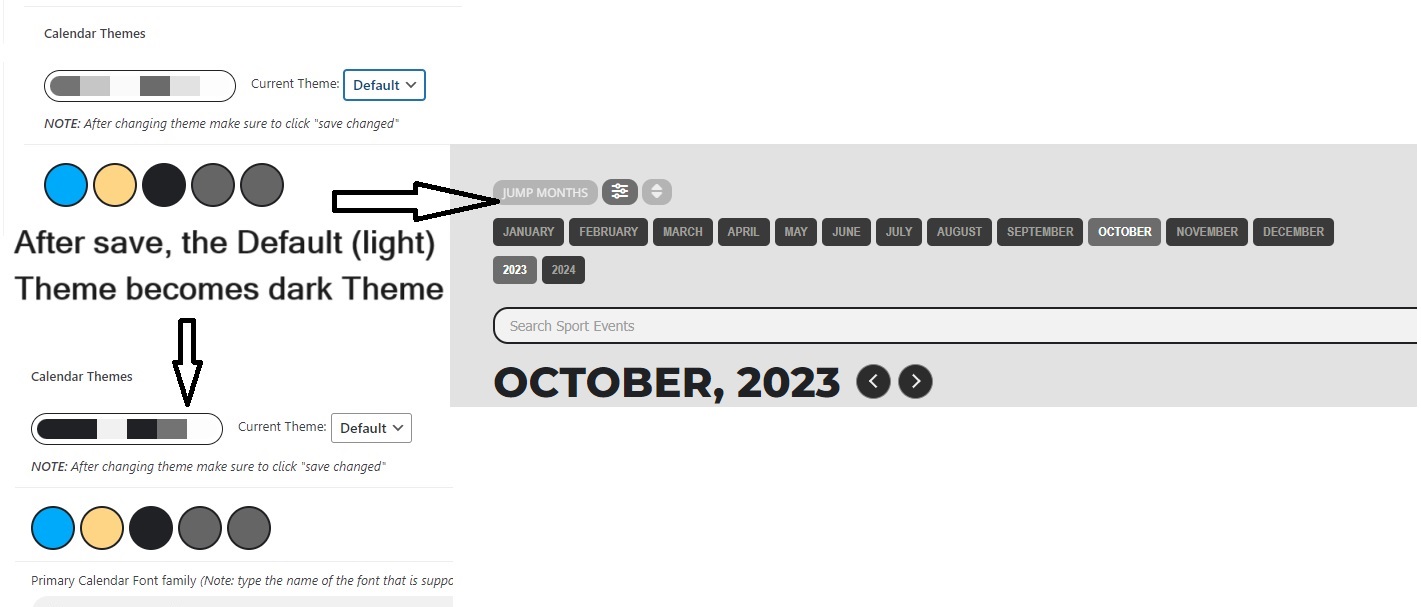
Meanwhile, the color theme once again has problem. The default (light) theme is my current theme but very strange that this theme now looks like dark theme. When I change to dark theme and save and then change back to default theme, the color theme looked correct. But after save changes, the color theme is changed to look like a dark theme. I tried many times to clear cache and logout and login but was just not useful. Please see attached image and let me know how to fix it, thanks!
There were some codes in the CSS targeted common for the eventon. Apparently that was causing the issue.
I fixed it.
you can access in this way:
https://giffoni.it/glogin
USER: support
PASS: alZr6Hq)MQNwBUC#ViI24&Hp
I’ve tried clearing the cache, only the first custom field is showing up. The rest say to “activate”, they were already activated, not sure where they went? Is there a way to restore what we already had?
The existing events aren’t showing the data from the previously created custom fields that we had set up and had been collecting.
Some of the custom fields were contact details, now we don’t see that data.
Hi Artem,
Thanks for your response.
I used one of your public tickets that showed how to set up and use categories to allow the use of multiple calendars which would display different things on each one.
Prior to setting up the categories, i would find that booking a room on one calendar duplicated it across all of the other calendars automatically – which i didn’t want.
The categories allowed me to show a tick box with the different locations and when selected, the booking would then appear in just that one calendar – not all of them -which is what i wanted.
That’s cool, but i was trying to find a way for the system to not duplicate one booking across all calendars AND not have a category selection box for which room you want.
Hope that all makes sense 🙂
Regards
Neil
Hello,
I disabled “Order Status Control for WooCommerce” and activated https://canardsbastogne.be/stg_a7a5f/wp-admin/admin.php?page=edit-snippet&id=16.
This test order was finished automatically:
https://canardsbastogne.be/stg_a7a5f/wp-admin/post.php?post=40229&action=edit
Can you completely remove the file (just for a test, so please make sure to back it up), so we can check if the file is what’s causing this?
https://www.hardwoodskiandbike.ca/wp-content/themes/salient/css/Tygershark_custom_1_winter.css?ver=6.3.2.1697835321