Hello,
1. Please take a look repeating events:
https://docs.myeventon.com/documentations/setting-up-repeating-events/
That’s the only option at the moment.
2.
a. Go to EventON > EventTop > select Select Default Calendar EventTop Style: Clear with left border colors and gaps.
Now go to EventON > Appearance > EventTop Styles > Background Color. If you don’t see any change, EventON > Scripts & Styling > turn off Write dynamic styles to header > save settings > turn on Write dynamic styles to header.
In order to change EventCard background, please go to EventON > Appearance > EventCard > Event Card Background Color.
b. Try enabling Tile Design by adding these to the shortcode:
tiles=”yes” tile_style=”2″ tile_bg=”1″
3.
a. Go to EventON > EventTop > remove fields.
b. Please see a.
c. Please take a look at this page:
https://dev2.myeventon.com/test-180/
Try this shortcode on
https://dev.myeventon.com/wp-admin/
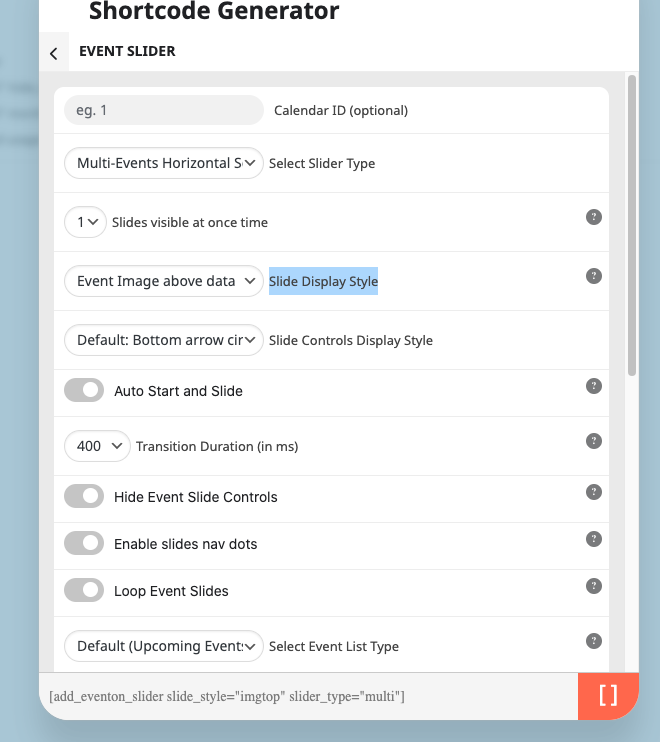
[add_eventon_slider slide_style=”imgtop” slider_type=”multi”]
Hello,
Please go to EventON > Action User > Emailing > enable Notify admin upon new event submission.
Could you send us a screenshot? Try adjusting this by changing 43px in the code.
Put the code to wp-admin > Appearance > Customize > Additional CSS.
I have the site up and running again. Switched the permalinks back to where they were, and also the events work again, all but one which is redirected to the homepage.
Setting the permalinks to where they were first resulted in more 404 errors. So I restarted php, aparche and ngnix to clear all server caches and deleted all the folders in the wp-content cache folder.
I disabled all plugins that were updated recently, also eventon. And reactivated them one by one with resetting the permalinks each time I activated a plugin.
When activating complianz a 404 error resulted at the events. But deactivating it, did not help. So I deactivated all plugins again before the complianz plugin and resetted the permalinks.
Possible suspect plugins are:
- the advanced ads plugins
- asset cleanup pro
- business directory plugin
- complianz
- eventon
You can deactivate/reactivate the plugins, but please bear in mind that this is a production site and all pages should be kept reachable, because it does not only hurt search engine rankings, but also results in a lot of 404 errors because the articles are shared on social media en mentioned in our daily news letter.
Hello Artem,
I purchased this additional add-on but you forgot to tell me it’s not usable for repeated events (message in events page: Invitees for RSVP: Is not available for repeating events.).
Unfortunately all our events are repeating ones. Can we solve this somehow? We just need to be able to manually add an attendee! We would really love to find a solution for this. If nothing is possible I am sorry but I have to ask again for a refund.
Thanks,
Cristiano
I didn’t receive the file. Could you upload it somewhere and send us a link?
We are glad your issue is resolved, if you have any further questions or concerns please create a new ticket.
If you have a moment, we would greatly appreciate if you could kindly leave us a review at myeventon/my-account!. Cheers!
Hello,
you can try this file, from different site, which i tried copy to new one. But nothing happened.
Language import export is working correctly, it is ok.
Lukas
Hello Ashan,
thank you very much for the fix. Take care!
Cristiano