here is the link to the invoice for the most recent renewed payment. I have changed the company name on subscription so it should be updated in the next renewal order.
https://helpdeskx.s3.amazonaws.com/wp-content/uploads/2023/09/06085801/invoice-38156.pdf
I am not entirely sure what is getting redirected? is it a click on an event is redirecting to something or is it click to join the event virtual link?
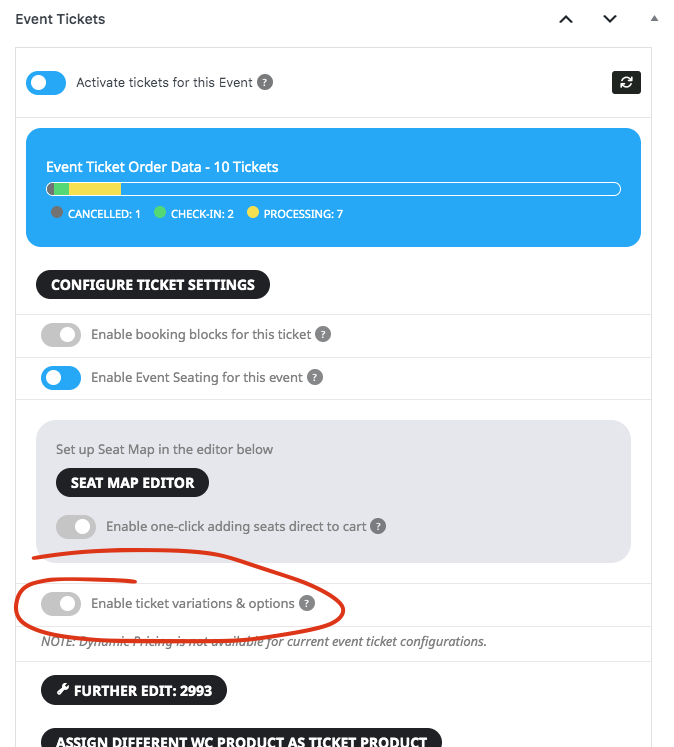
Another thing I noticed is if you are using variations and options but do not actually have variations set up that throws this error. Please disable this and try for now. I will add proper validations check in next release.
I have re-checked but the Vie RSVP Stats only show one RSVP and not the ones related to different dates (repeated ones)
Still the old company! Please change it!
Still the old company! Please change it!
There is no ip blocking, please offer some real advice.
Ok, that didn’t work for me. I made a video so we can move along quickly.
Chef Julia has a class on Saturday and as of now, no one has access to the PDF files for her class. The HTML code doesn’t appear anymore in the Dashboard and in the email nor in the PDF that is generated. yikes.
May I have you watch this video? https://screenpal.com/watch/c0Q12QVCh7v
In the past, I would just open the ticket settings and the HTML, customers would have access to download the files and now, they can’t.
I understand generating the PDF, but even then the HTML code does not show so it’s useless.
Please help
becky
Hello,
Thank you for your great suggestion, at the moment it is not supported. However please create a new ticket and select Feature Request as category so others can vote on your idea and get it moved into development faster.