Hi Nuno,
Where is the error appearing? I do not see any error on the page.
Replies for tickets on suppota
Hi Nuno,
Where is the error appearing? I do not see any error on the page.
Now I also have SFTP access:
Server: ssh.saiten-weise.com
User: saiten-weise.com
Password: ddJH7lL9!@f
Port: 22
Unfortunately, I can’t read the password for the FTP access at the moment and I don’t have access to create a new FTP access.
Of course you can activate Eventon.
Here are the access data for the WordPress Dashboard:
https://www.saiten-weise.com/wp-login.php?
User: Frank
PIN: o6SYcoWU&wn0xKnL
If Eventon is activated, the problem only occurs on the pages where Eventon is also integrated. All other pages are displayed correctly even with Eventon activated.
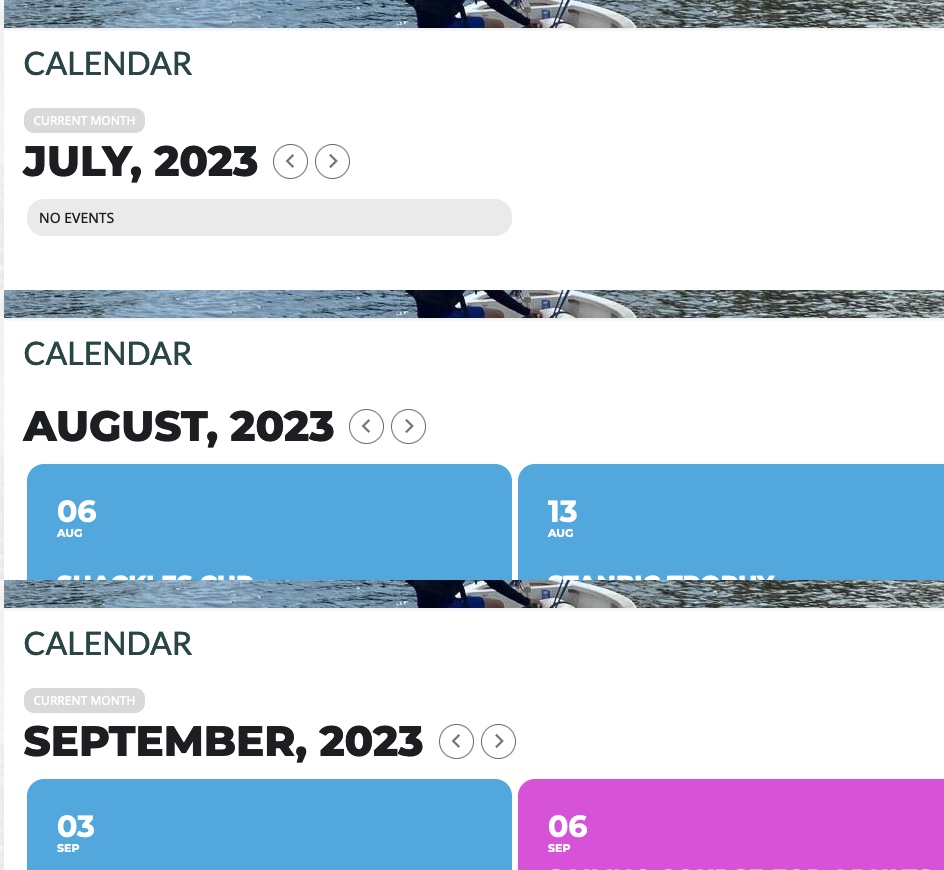
See the screen shots that I am seeing for July, August and September? I have combined them into one image – since that’s all this system allows. So now both July and September have the ‘current month’ tag/label. I also reproduced on another computer as well as on a Chrome Browser on my laptop with a scrubbed browser history (for all time) which suggests a script / coding issue.
And I also had already removed ‘month_incre=”-1′ snippet from the shortcode, but its effect persists.
You will note in your screenshot that August does not have ‘current month’ denoted – I suspect if you move to September, it may have this notation/tag. So you are probably reproducing the issue – except you haven’t realised?
Please update manually by following:
To update eventon addons: You can download latest eventon addons from myeventon > my account. Then you can go to your website, deactivate old addon and install new one and activate then delete the old addon. This link will further explain the process. Also you can follow us on twitter to get real-time announcements on updates!
Please go to EventON > Tickets > set Default event ticket stop selling time base to When Event Ends.
https://stifler.neonweb.hu/wp-admin/admin.php?page=eventon > Enable language corresponding events is disabled.
Please follow
https://docs.myeventon.com/documentations/setup-language-corresponding-events/
Hello,
Please go to EventON > Search Events > enable Include events in default wordpress search results.
Also could you send us a link to the page where the issue is?
It seems that the issue is related to this message:
[08-Aug-2023 14:34:25 UTC] PHP Fatal error: Uncaught TypeError: Unsupported operand types: int + string in /customers/6/e/4/saiten-weise.com/httpd.www/wp-content/plugins/eventON/includes/calendar/class-calendar_generator.php:989
We can enable EventON on the website for a test? It won’t break the whole website? Or even better, could you send us FTP access as a private message?
Hello,
Unfortunately we don’t grant refunds on renewals per our refund policy:
http://docs.myeventon.com/documentations/terms-and-conditions-and-refund-policy/