Unfortunately, our staff do not work during weekend and any questions asked right before weekend or during weekend will not be answered until our staff returns. We appreciate your understanding!
Archives: Replies
Replies for tickets on suppota
Reply to: tickets(322601)
There is a new version of the add-on available – 2.2.3. Could you update?
To update eventon addons: You can download latest eventon addons from myeventon > my account. Then you can go to your website, deactivate old addon and install new one and activate then delete the old addon. This link will further explain the process. Also you can follow us on twitter to get real-time announcements on updates!
Reply to: tickets(322801)
New version of the add-on 2.2.3 is available. Please update and it should fix the issue.
To update eventon addons: You can download latest eventon addons from myeventon > my account. Then you can go to your website, deactivate old addon and install new one and activate then delete the old addon. This link will further explain the process. Also you can follow us on twitter to get real-time announcements on updates!
Reply to: tickets(313837)
Could you update EventON to 4.4.3 and Event Lists: Ext add-on to 1.0?
To update eventon to latest version: If you are unable to do autoupdate, you can go to codecanyon your account > download and get the latest eventon version as zip file. Then you can go to your website > make sure “Delete eventon settings & data when EventON is uninstalled” is Deslected from eventon settings, delete old eventon, install new one and activate. This link will further explain the process it. Also you can follow us on twitter to get real-time announcements on updates!
To update eventon addons: You can download latest eventon addons from myeventon > my account. Then you can go to your website, deactivate old addon and install new one and activate then delete the old addon. This link will further explain the process. Also you can follow us on twitter to get real-time announcements on updates!
Reply to: tickets(322787)
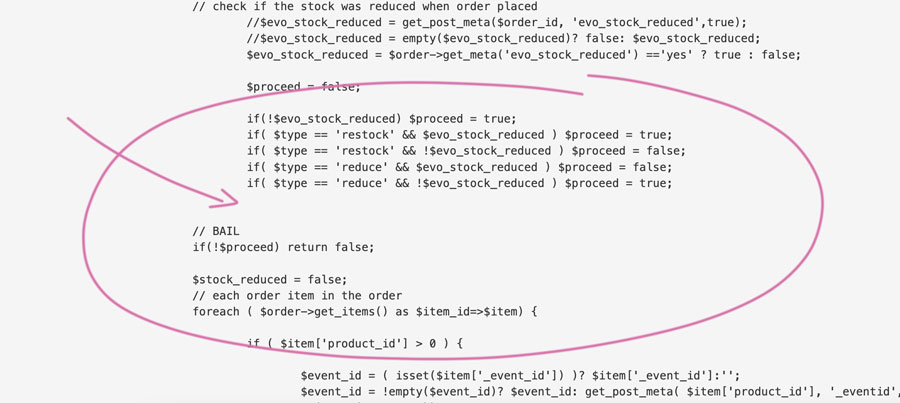
Hello Artem,
The code should be in that location? (see image)
I don’t understand what exactly should i put. I don’t put the strikethrough text?
Only this?
// if auto restock failed orders
$restock_failed_val = EVO()->cal->check_yn(‘evotx_restock_failed’,’evcal_tx’);
Sorry but I don’t have much knowledge about this. If it’s possible, please copy and paste here, the text that should be in that location.
Thank you for your help,
Reply to: tickets(322715)
If you have any further questions or concerns please create a new ticket.
Reply to: tickets(322715)
Thank you for your great suggestion. Please create a new ticket and select Feature Request as category so others can vote on your idea and get it moved into development faster.
Reply to: tickets(322779)
It worked for the main calendar:
Now please do the same with add-ons. They all have .css file in their folder.
Reply to: tickets(321689)
Please try WP Fastest Cache plugin.
Reply to: tickets(322869)
Hello,
I am sorry, the access information you have provided did not work for us. Please check them and post the correct login information as a private message, thank you!
Could you make sure that you are using latest versions of Tickets and Seats add-ons?