Hello,
Please go to EventON > EventCard Design > add RSVP Event Box.
Replies for tickets on suppota
Hello,
Please go to EventON > EventCard Design > add RSVP Event Box.
Changed to red color on our test server:
https://dev2.myeventon.com/46994-2/
Hello,
Please go to EventON > Appearance > EventTop Styles > Event Title font color.
If you don’t see any change, EventON > Scripts & Styling > turn off Write dynamic styles to header > save settings > turn on Write dynamic styles to header.
It seems that we changed the code structure. So please use this code to move the image to the left:
@media only screen and (min-width:960px){ .evo_tax_img.padb20 { float: left; width: 50%; padding-right: 27px; }}
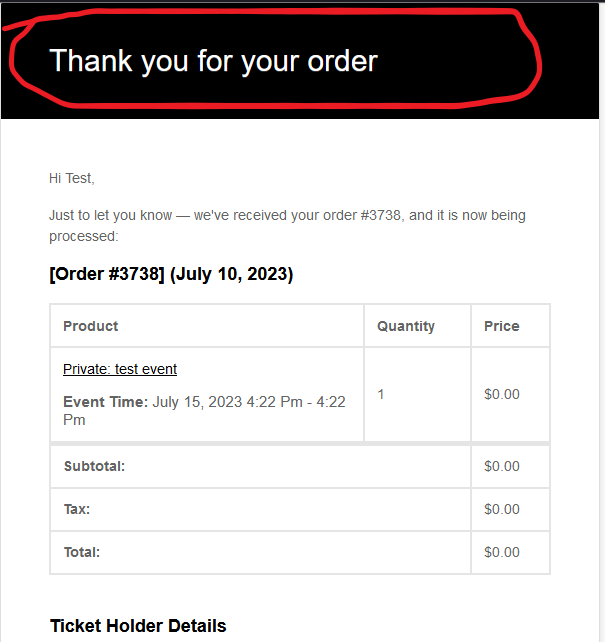
Here is the confirmation email with the part I need changed circled in red. Thanks!
Thank you for the info! We will look into this.
If you have any further questions or concerns please create a new ticket.
Hello,
In the current calendar design the background comes from Edit Event > Event Color.
Please go to EventON > Event Top > Select Default Calendar EventTop Style: Clear with left border colors. This way EventON uses the color from Appearance.
Also what is the way to add space between date and title?
Please add this CSS code to EventON > Styles (If you don’t see any change, EventON > Scripts & Styling > turn off Write dynamic styles to header > save settings > turn on Write dynamic styles to header):
.eventon_events_list .eventon_list_event .evoet_cx, .evo_pop_body .evoet_cx { margin-right: 20px; }
Hello,
Thank you for your messages, I am going to assign this ticket to Ashan and he will be able to take it from here and find you a solution. Please allow some time for him to get back to you, we greatly appreciate your patience and thank you for being a eventon customer!
Hello,
If you go to https://www.myeventon.com/my-account/edit-address/billing/ you can edit the address and add TVA number under company name. And then apply it to all the active subscriptions and see if generating invoice make correctly with TVA. if it doesn’t, send us the TVA number and we can include in the invoice for you.

The shortcode you provided didn’t show events from different month.?
I want to do this (see attached) with the event type as the controller, and all events from the event type displayed in a row irregardless of month.
Right now each month creates a new row.
Is this what I need to accomplish this?: