Shortcode is:
[add_eventon_list number_of_months=”12″ show_year=”yes” show_et_ft_img=’yes’ hide_empty_months=’yes’]
Also shared credentials. PLEASE TAKE NOTE: THIS IS A LIVE WEBSITE, SO BE CAREFUL
Replies for tickets on suppota
Shortcode is:
[add_eventon_list number_of_months=”12″ show_year=”yes” show_et_ft_img=’yes’ hide_empty_months=’yes’]
Also shared credentials. PLEASE TAKE NOTE: THIS IS A LIVE WEBSITE, SO BE CAREFUL
Hi Artem, how would we access that code? We use Elementor to build our site so no sure how to view it as HTML. Thanks
Hello yes my problem is solved, thank you, but where can i find th “return;” value, so i can do also the other websites myself?
now, yes, working.
but i’m not undestand real problem.
clicking reset permalinks not help me.
at last i downgrade eventon. and upgrade later.
But i’m not sure, that this was a problem.
I check and add capabilities. Ok, my test with image upload: is working
Peter Gui,
Please send us wp-admin access to your site from “Access Info” box on right side menu, to further assist your situation.
I am going to apply the patch to your website.
Hello,
Here is a patch fix that will fix it. Remove the “return;” value in the code.
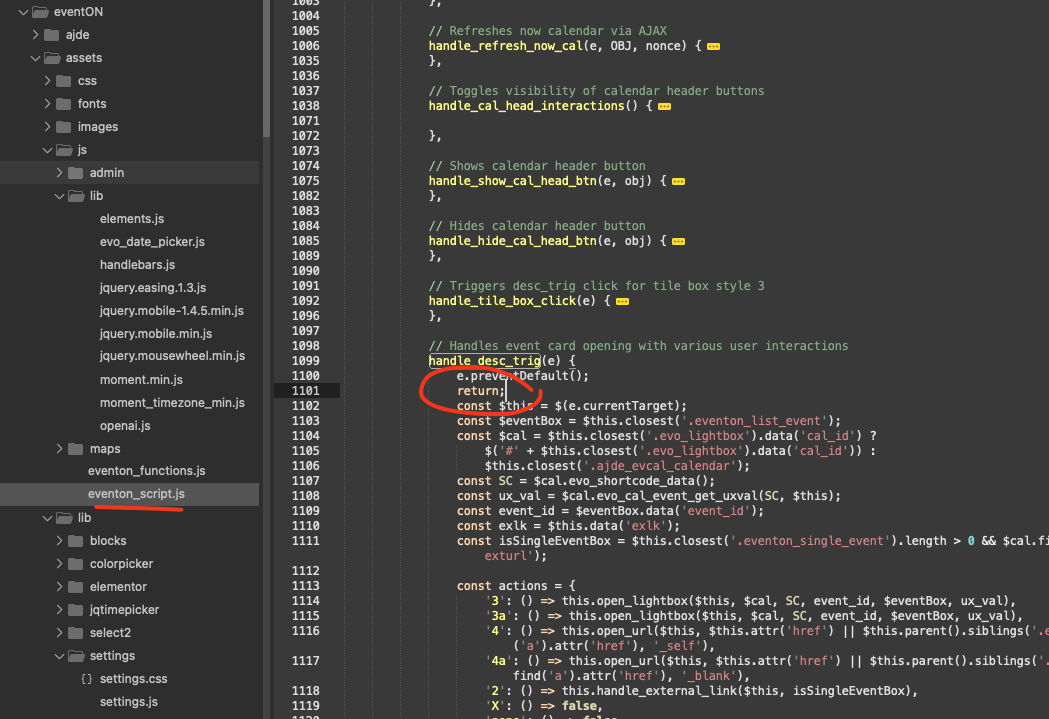
Hello,
Here is a patch fix that will fix it. Remove the “return;” value in the code.
I’ve already applied it to your website. So please check with manually cleared browser cache.
Hello,
Could you elaborate more? You cannot open events?
Seems to be working on my side:

Hello,
Here is a patch fix that will fix it. Remove the “return;” value in the code.