Please go to EventON > Event Card > select Feature image display style: Direct Image.
Archives: Replies
Replies for tickets on suppota
Reply to: tickets(309955)
We are glad your issue is resolved, if you have any further questions or concerns please create a new ticket.
If you have a moment, we would greatly appreciate if you could kindly leave us a review at codecanyon! from your account > downloads. Cheers!
Reply to: tickets(313221)
Can we take a look at wp-admin? Please send us wp-admin access to your site as a private message for us to further assist your situation.
Reply to: tickets(309955)
Thank you, that worked.
Reply to: tickets(313049)
I optimized the databse, I installed a new caching system, I changed the shortcode to open the events in a single site.
The admin-ajax.php still needs about 30s. The rest of the site is really fast.
There must be a problem with the weekly view addon.
Reply to: tickets(313221)
Here is the short code :
[add_eventon etc_override=”yes” show_et_ft_img=”yes” ft_event_priority=”yes” grid_ux=”3a” style=”names” accord=”yes” eventtop_date_style=”1″]
Rendering is OK but not the event type color.
Reply to: tickets(312914)
Hello,
1. Please add this CSS code to EventON > Styles (If you don’t see any change, EventON > Scripts & Styling > turn off Write dynamic styles to header > save settings > turn on Write dynamic styles to header):
.ajde_evcal_calendar.sev #evcal_list .eventon_list_event, .ajde_evcal_calendar.cev #evcal_list { border-radius: 0 !important; }
2. Go to Edit Event > select “Do nothing”:
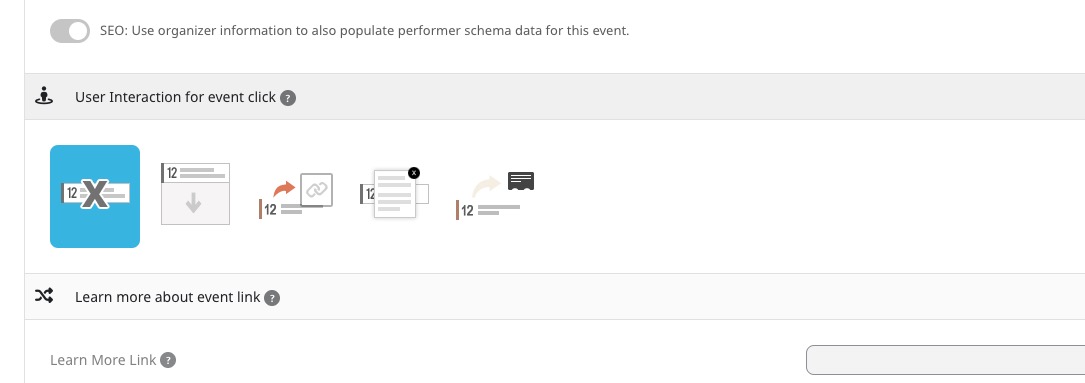
Make sure that your shortcodes don’t ux_val option included.
3. Use this CSS code:
.ajde_evcal_calendar .EVOWV_grid .evo_wv_day .evowv_daybox:hover { background-color: red; }
4. Use this code:
.EVOWV_grid .evo_wv_day .day_events { display: none !important; }
Reply to: tickets(312778)
You need to add it to functions.php of the theme. The best is to create a child theme and add the code there.
Reply to: tickets(312898)
Yes, with certain hacks. WordPress doesn’t have any built-in security features, so uploading images aren’t allowed by default.
Reply to: tickets(313272)
Variations:
https://www.myeventon.com/addons/ticket-variations-options/
Try it on
https://dev.myeventon.com/wp-admin/