Updating should fix the issue.
Archives: Replies
Replies for tickets on suppota
Reply to: tickets(312190)
Hello,
Please update EventON to 4.3.4.
To update eventon to latest version: If you are unable to do autoupdate, you can go to codecanyon your account > download and get the latest eventon version as zip file. Then you can go to your website > make sure “Delete eventon settings & data when EventON is uninstalled” is Deslected from eventon settings, delete old eventon, install new one and activate. This link will further explain the process it. Also you can follow us on twitter to get real-time announcements on updates!
Reply to: tickets(311948)
According to this guide you open your scanner app, then scan a ticket and you should be redirected to checkin page on your site. At this point choose to open the link in safari. Now, if you want to scan another ticket, you need to open the scanner app again:
https://docs.myeventon.com/documentations/use-qr-code-addon-check-attendees/
Reply to: tickets(312198)
Hello,
Please use Event Type for this:
https://docs.myeventon.com/documentations/confused-event-type-categories/
Just create a new category for repeating events only, then show them on the calendar.
Reply to: tickets(312199)
Hello,
Which add-on are you referring to? Could you elaborate? Not sure what do you mean by “extra guest”.
Reply to: tickets(312200)
Hello,
Please take a look at this guide:
https://docs.myeventon.com/documentations/show-calendar-another-site-via-iframe/
Also check Event API add-on:
https://www.myeventon.com/addons/event-api/
Try on https://dev.myeventon.com/wp-admin/
Reply to: tickets(311770)
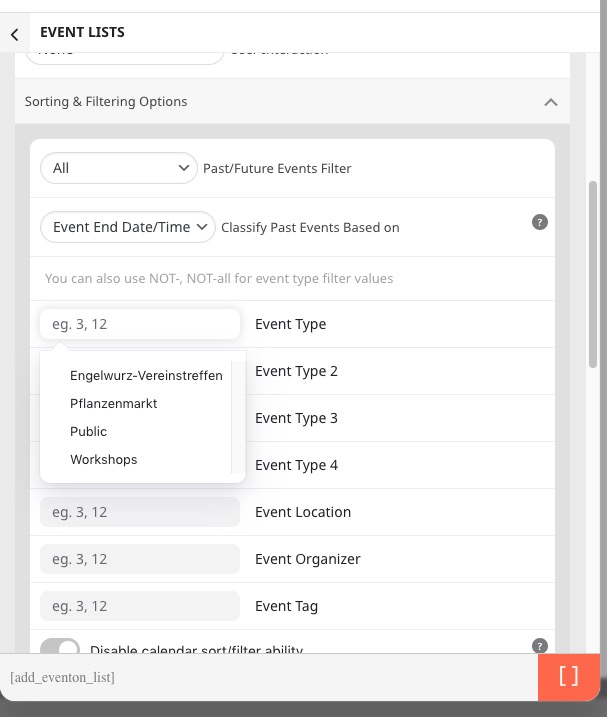
OR You can just go to https://engelwurz.at/wp-admin/admin.php?page=eventon#evcal_012 > open Shortcode Generator > click on Event Lists > now click on Event Type:
Reply to: tickets(311770)
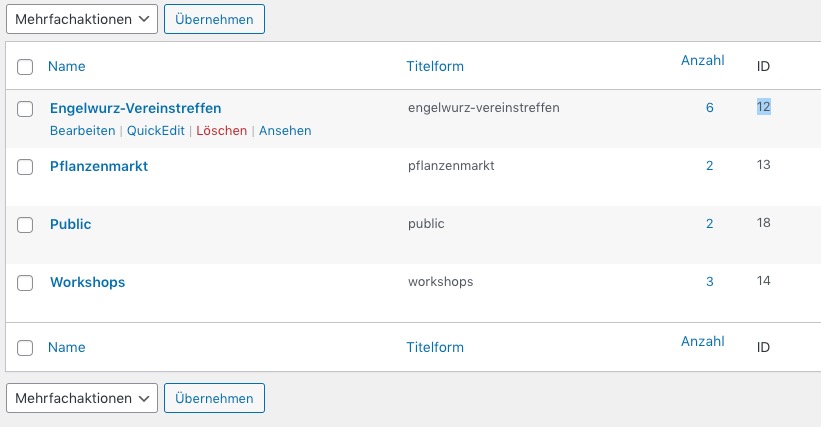
Please go to https://engelwurz.at/wp-admin/edit-tags.php?taxonomy=event_type&post_type=ajde_events.
IDs can be found in this column:
Reply to: tickets(312210)
Hello,
Thank you for your great suggestion, at the moment it is not supported. However please create a new ticket and select Feature Request as category so others can vote on your idea and get it moved into development faster.
Reply to: tickets(311770)
https://engelwurz.at/wp-admin/
admin-engel
HruwX2p%1y