Hey Markus are you able to enable wp editor so I can make some changes to codes and see what would fix this.
https://docs.myeventon.com/documentations/how-to-enable-plugin-editor-for-wordpress/
Replies for tickets on suppota
Hey Markus are you able to enable wp editor so I can make some changes to codes and see what would fix this.
https://docs.myeventon.com/documentations/how-to-enable-plugin-editor-for-wordpress/
Please update RSVP add-on to 2.9.2. It will solve the issue.
Please update RSVP add-on to 2.9.2. It will solve the issue.
please update to RSVP latest version 2.9.2
https://docs.myeventon.com/documentations/changelog-rsvp-events/
I just want to see the screenshot of these issues thats all. 🙂
To be honest guys, I do not know what would be another way to pass these virtual data into an event….
If you have more questions, kindly send us a new ticket and we would be more than happy to help you resolve your issues!
Francisco such harsh demands my friend, refund if the issue is not fixed ?
You installed the update by yourself didnt you? we didnt make you do it. 🙂
Anyways, i have added some code changes to your site please let me know if that resolved the issue on your site.
And if you check the website in other browser? Could you tell us if you have any adblock extensions installed on the browser?
Please check now.
Ashan,
The issue is that the top part of EventTop Designer is just a column on the same line as other columns:
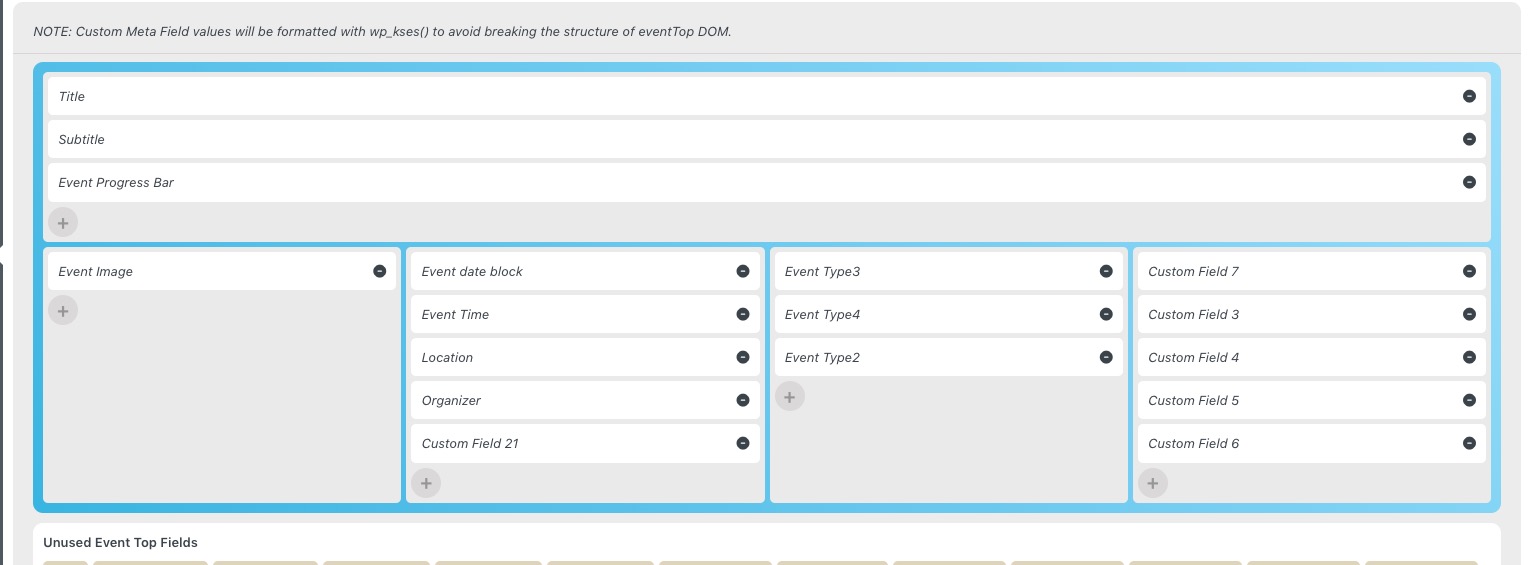
Shouldn’t it be on the top?