Hi, thanks for the response.
There seems to be documentation on the CSV Import plug-in, because you included a screen shot from such a page – yet I can’t find that documentation anywhere. Can you tell me where to find the documentation on that plugin?
There are only a few problem-specific notes here:
https://docs.myeventon.com/documentation/addons/csv-event-importer/
Okay, thanks for all the info. Plenty to think about. I’ll close this ticket, and get back to you if I need any further assistance.
I figured out where that code was, it was at the bottom, so emergency averted!
That’s a great idea and pretty genius, but only if it targets just the submit popup.
I did see the Lat and Long code was somewhere in the middle of the code.
Instead of taking out the code, can you just tell me what it is and I’ll go find it and then I can comment it and put it in the right place so I know exactly where and what it is.
The reason I don’t want you to take out the code is because I don’t want the site to break while I have people looking at it.
Thanks so much for all the help, I really appreciate it!!!!
Hi,
Just checking if there is an update here.
Thanks!
Hi,
Thanks for the work, most of it is great!
But I kinda have a big emergency which you’ll see in #2. (It broke my site so I can’t show to client)
1: I cannot find where you put that code – I looked in the custom CSS. Could you please remove that and just give me the code so I can put it where I can find it in my theme? It all works fine (except for one thing I’ll tell you in a minute)
2: When you made the text in the box white, it hid all of my text in all of my search boxes. This doesn’t work at all – another reason I need that code removed. I can’t show anyone the site because the search boxes need my custom code for colors and the text in the boxes.
3: Not a big deal but I can’t get the checkbox code to work and get bigger. (The last css from the video) The scrollbar is gone, so that is great.
Right now my main issue is that all my text in input boxes is now white…
Thanks for the help!!!
Got it. The workaround will get me going!
Found it, used it and that worked. (Good instructions and thank you for the visuals – I was able to find exactly where I needed to be.)
Appreciate it very much.
(You guys are going to make me into a programmer yet – LOL!)
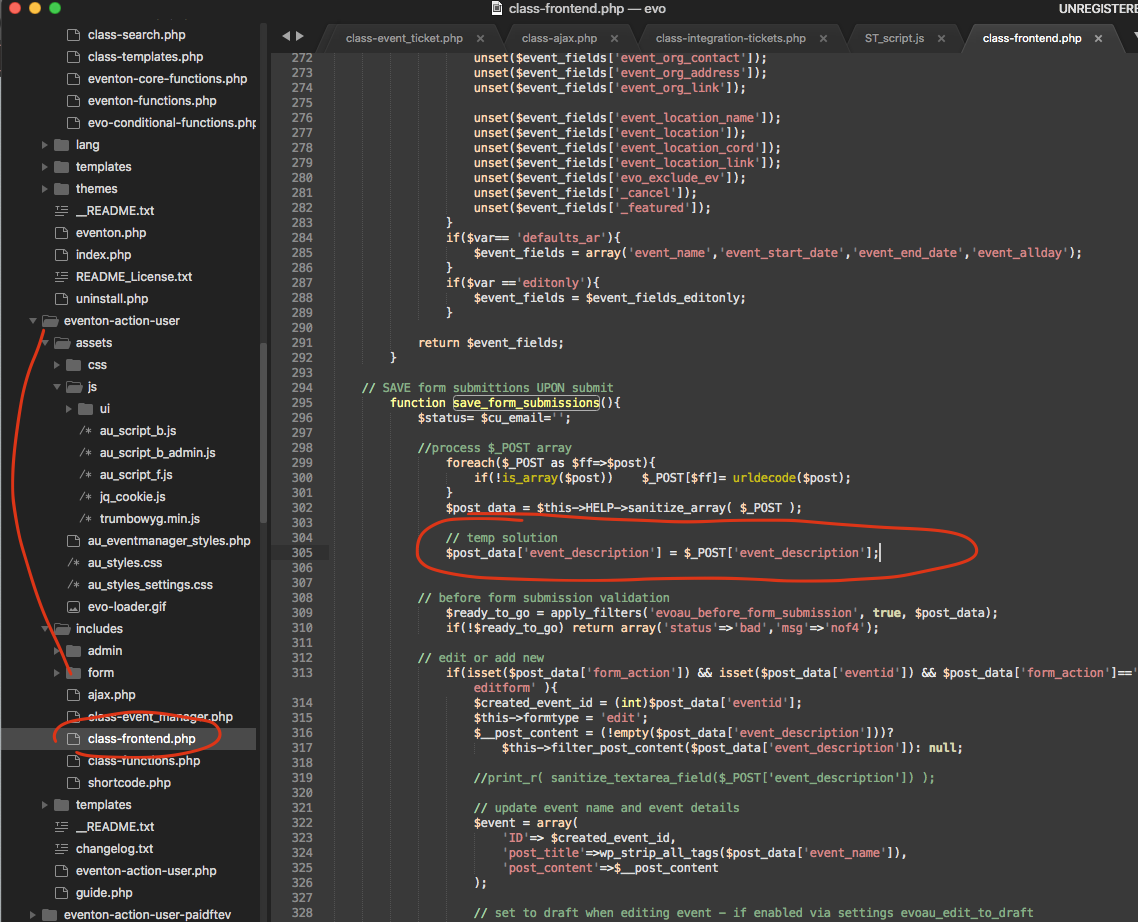
Kindly check the patch solution I posted for this ticket>> https://helpdesk.ashanjay.com/ticket/using-the-edit-my-events-option-strips-all-formatting-from-event-text/
this will also help resolve your issue temporarily.
here is a temporary solution. What is happening is the form submission sanitize the event details and remove all html formatting. This temp solution override those sanitization for just the event details. You can use this for the moment. It is a temp solution and we will work on a more secure better solution.
Many thanks for your patience and bringing this to our attention!
Kind Regards
not sure where you added the css
but could let me know where you added it and also try this
change the padding-right to 0px
and add
.eventon_events_list .eventon_list_event .evoet_cx .evoet_cmf {
font-size: 15px!important;
}