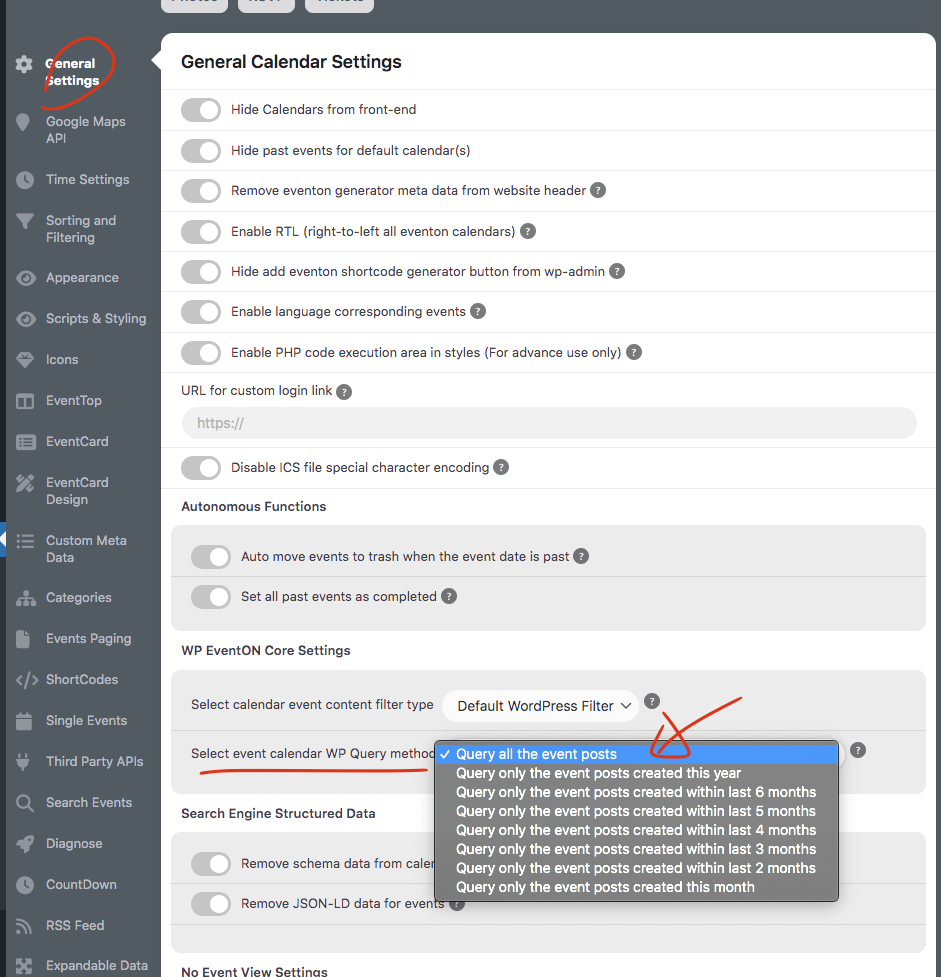
it does uses the event start value. But you gotta make sure you are loading all the events not just events published in certain time set in eventon settings. here
Replies for tickets on suppota
it does uses the event start value. But you gotta make sure you are loading all the events not just events published in certain time set in eventon settings. here
Yes we are aware of it and are working on finding a better resolution that will be able to sanitize the input field.
Hi there Joao, we do not have a custom bundle but you can use the code EVO20T and get 20% off at the check out 🙂
I have refunded you for both waitlist and wishlist addons. please go ahead and purchase the actionUser Ryan.
Thank you very much for the review!
would you mind sharing the order ID for those?
Are you not able to see the license key information at https://www.myeventon.com/my-account/licenses/
Liceneses look good from our system side
Hello,
Could you try this code:
#evorsvp_form .form_row input.name[name=last_name] { display: none !important; } #evorsvp_form .form_row.email { display: none !important; }
Just to be sure I understand… So first I buy an additional Eventon license for the different domain, then I can import the calendar I made on the original lisensed site with the addon into the new Eventon? Right?
And then when I make a change on site one- I import it again. Is that correct?
Thanks so much!
Hello,
Unfortunately, EventON EventBrite add-on isn’t our product. Please ask the plugin developer directly: https://codecanyon.net/user/momo-themes
I installed 15.1.0 version and it seems to be working correctly. Could you elaborate on what should we do to recreate the issue?