Perfect, it’s solved.
Thsnks a lot for your prompt reponse.
Replies for tickets on suppota
Perfect, it’s solved.
Thsnks a lot for your prompt reponse.
Added a new custom field for a test:
https://canardsbastogne.be/wp-admin/admin.php?page=eventon#evcal_009
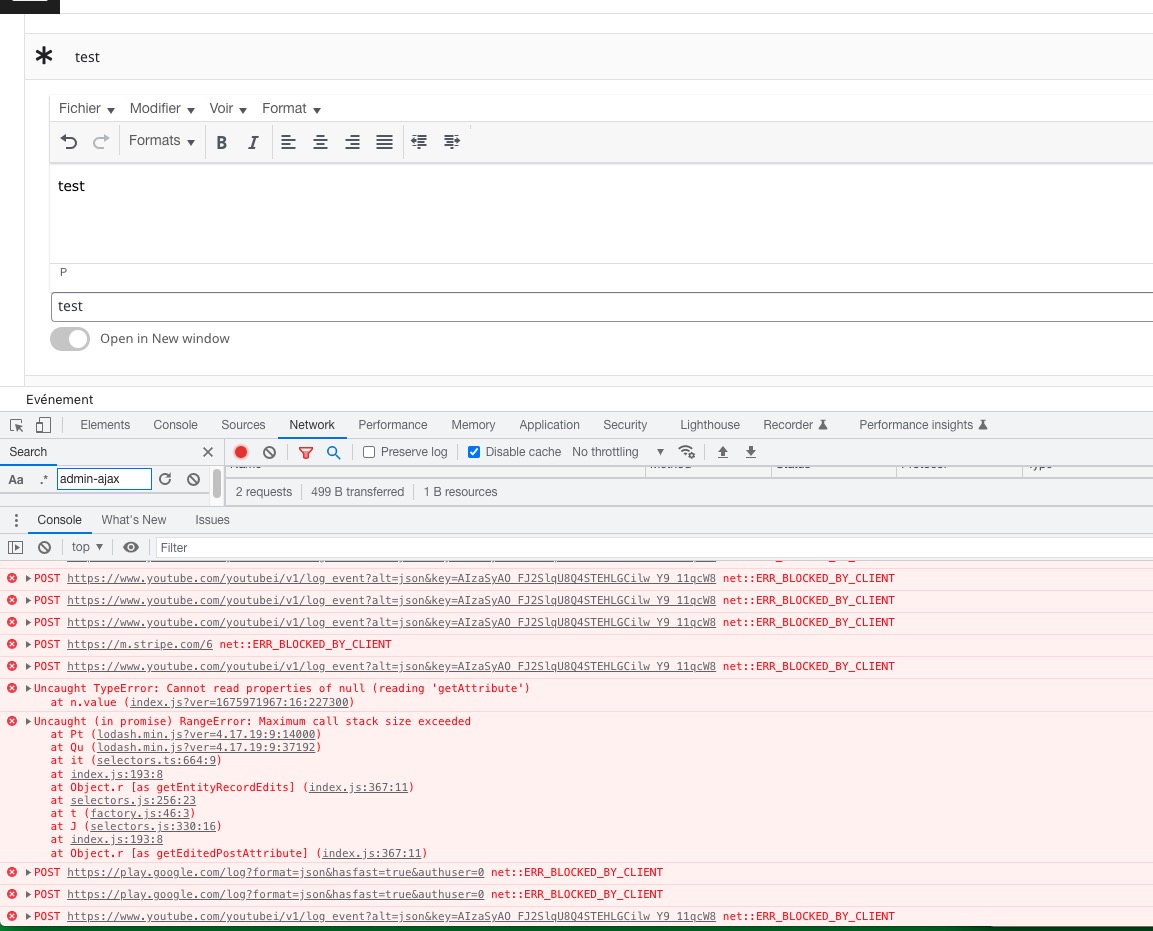
But now I cannot update an event at all because of these js errors:
 I cannot recreate the same behaviour on our test server, so can we try the instructions mentioned in this documentation to make sure your issue is indeed coming from eventon.
Hi Remi,
Thanks for your response.
I checked and it seems the page is loading February calendar (see the attached image)
Kindly confirm, am I missing something?
My Woo’s Payment option settings: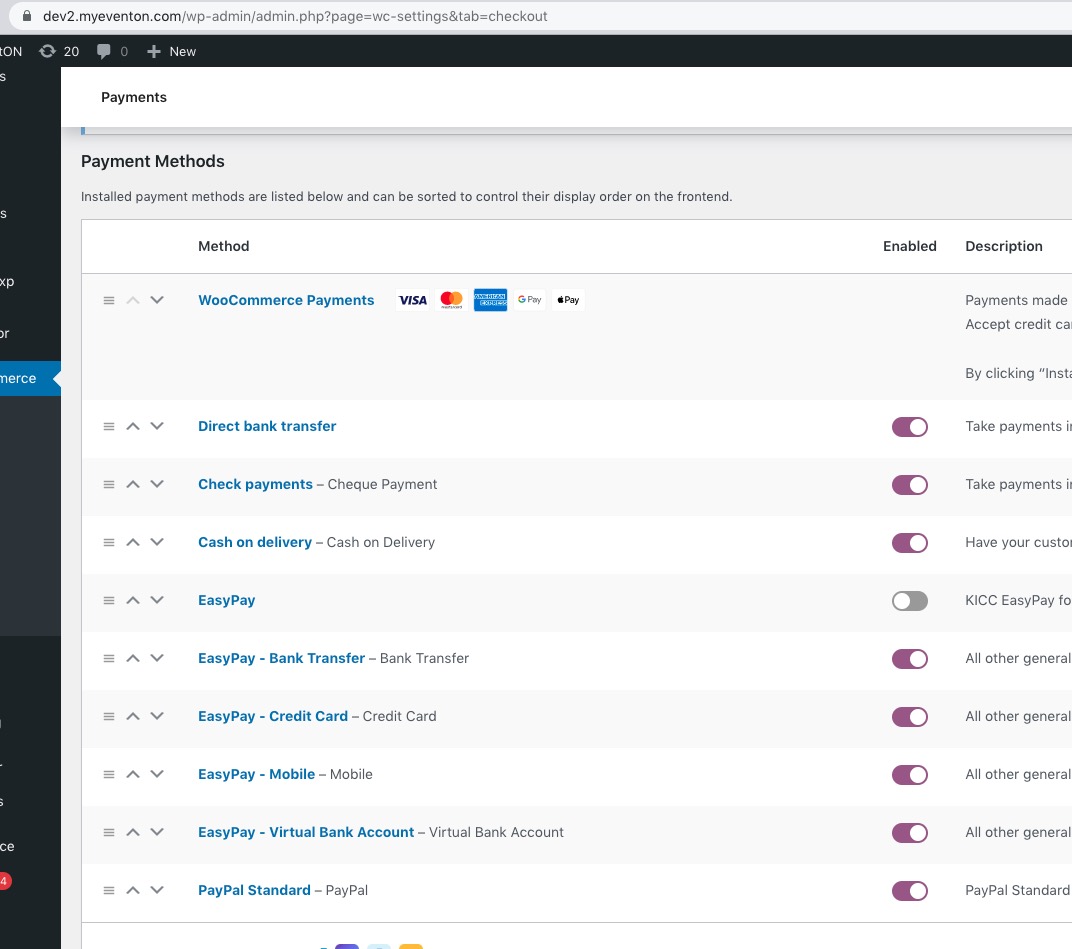 No EasyPay though:
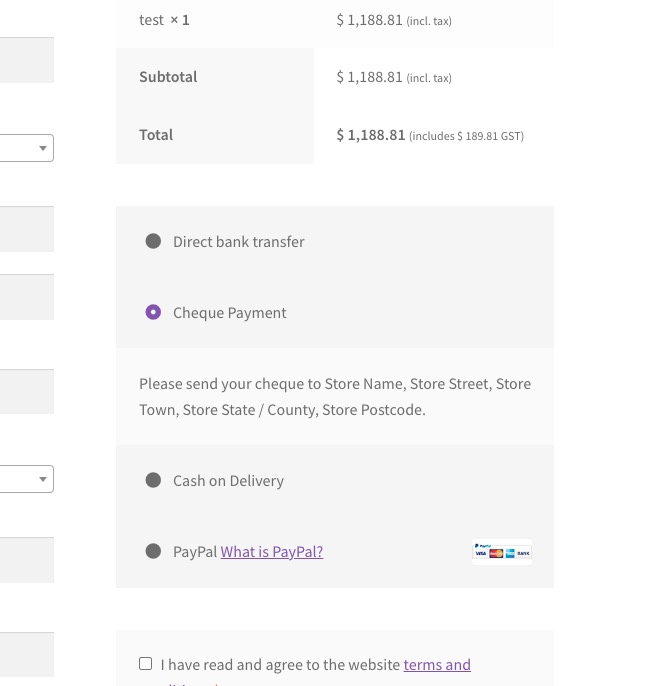 Have you tried this:
Could you try the same with a regular WooCommerce Product?
Hello,
Since Event Organizer is a taxonomy, please try following this guide:
https://space-themes.com/how-to-change-a-custom-taxonomy-slug-in-wordpress-without-a-plugin/
Also create a new ticket and select Feature Request as category so others can vote on your idea and get it moved into development faster.
You can rename Organizer by following these guides:
https://docs.myeventon.com/documentations/translating-eventon-backend/
https://docs.myeventon.com/documentations/how-to-translate-calendar-front-end/
Learn More. Please go to EventON > Language > Learn More link text.
It seems that the only way of achieving what you want is to follow Other Uses (Advanced):
https://docs.myeventon.com/documentations/shortcode-generator/
You need to somehow get the tag name and then put it into the shortcode:
<?php
echo do_shortcode(‘[add_eventon event_tag =”‘.$event_tag.'”] ‘);
?>
Make sure to test everything before applying to the live server.
Hello,
By default EventON doesn’t show anything when you open a tag page:
https://dev2.myeventon.com/tag/aaa/
Could you tell us more about how you managed to achieve this?
Here’s the issue:
[09-Feb-2023 19:12:23 UTC] PHP Fatal error: Uncaught RuntimeException: Can’t open filehttps://brunswicklandingmarina.com/wp-content/uploads/2023/02/basic-5.ics for reading in /home/brwickmarina/public_html/wp-content/plugins/eventon-ics-importer/includes/lib/IcalParser.php:51
Stack trace:
#0 /home/brwickmarina/public_html/wp-content/plugins/eventon-ics-importer/includes/class-functions.php(20): omIcalParser->parseFile(‘https://brunswi…’)
#1 /home/brwickmarina/public_html/wp-content/plugins/eventon-ics-importer/includes/class-settings.php(328): EVOICS_Fnc->get_events_from_ics(‘https://brunswi…’)
#2 /home/brwickmarina/public_html/wp-content/plugins/eventon-ics-importer/includes/class-settings.php(176): EVOICS_settings->display_events()
#3 /home/brwickmarina/public_html/wp-content/plugins/eventon-ics-importer/includes/class-settings.php(162): EVOICS_settings->import_content(‘ni’)
#4 /home/brwickmarina/public_html/wp-content/plugins/eventon-ics-importer/includes/class-admin-init.php(38): EVOICS_settings->content()
#5 /home/brwickmarina/public_html/wp-includes/class-wp-hook.php(308): EVOICS_admin->page_content(”)
#6 /home/brwickmarina/public_html/wp-includes/class-wp-hook.php(332): WP_Hook->apply_filters(”, Array)
#7 /home/brwickmarina/public_html/wp-includes/plugin.php(517): WP_Hook->do_action(Array)
#8 /home/brwickmarina/public_html/wp-admin/admin.php(259): do_action(‘eventon_page_ev…’)
#9 {main}
thrown in /home/brwickmarina/public_html/wp-content/plugins/eventon-ics-importer/includes/lib/IcalParser.php on line 51
Could you try following this:
NOTE: If you are having trouble importing using URL, please make sure allow_url_fopen is enabled in your PHP configurations on the server
Lets start by making sure that all your add-on are update.
Please check for latest versions here Your issue might be related to an older version you are running and we might have resolved this already in the newer version update. If you are on latest version of our software and the issue still persist please let us know.
When all done follow the instructions in this documentation to activate debug in your site to see any PHP errors recorded that can provide insight on to whats going on. Please reply with a link to debug.log file. If you are not able to do this please send us FTP access to your site so we can do this for you.
Hello,
Please add this CSS code to EventON > Styles (If you don’t see any change, EventON > Scripts & Styling > turn off Write dynamic styles to header > save settings > turn on Write dynamic styles to header):
.ajde_evcal_calendar .calendar_header .evo_header_title { display: none !important; }