Maybe create two calendars, one for past events and the other for future events and put them in Tabs or even separate pages.
Archives: Replies
Replies for tickets on suppota
Reply to: tickets(305116)
Hello,
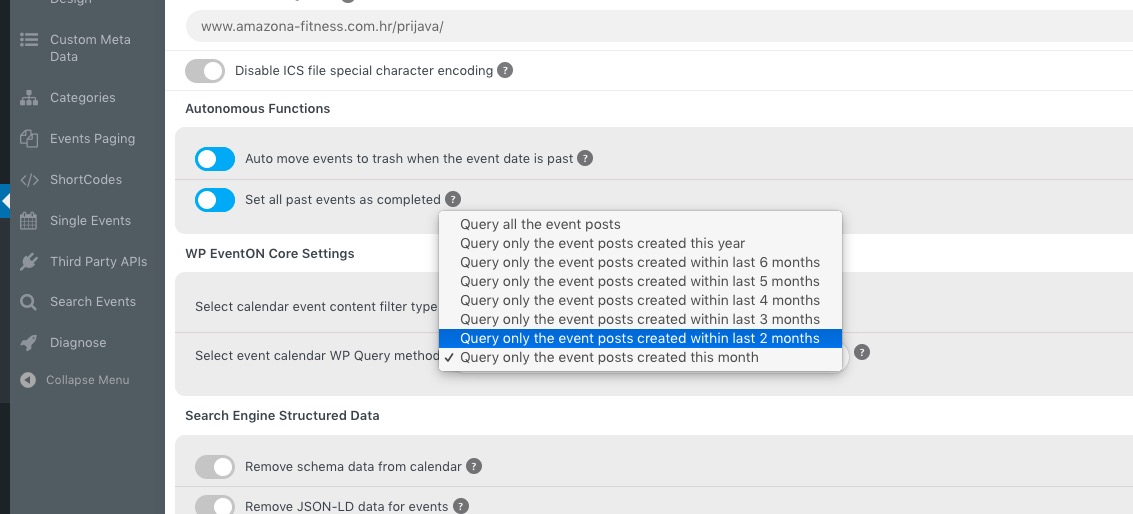
Could you go to https://amazona-fitness.com/wp-admin/admin.php?page=eventon and try selecting 2 months?
Reply to: tickets(305113)
Hello,
week_style=”1″ is the right option, but you also need to add table_style=”1″:
[add_eventon_wv week_style=”1″ table_style=”1″]
Could you try and let us know?
Reply to: tickets(305129)
I dont think this is addressing the issue.
When I hover, the featured image is transparent(thus making the colors appear blur and muted).
Instead, I want the featured image to be 100% opaque, always.
And I want the overlay to be % transparent, until I hover. At which point it would 100% remove the overlay and show the 100% opaque image.
Reply to: tickets(283094)
We are glad your issue is resolved, if you have any further questions or concerns please create a new ticket.
If you have a moment, we would greatly appreciate if you could kindly leave us a review at codecanyon! from your account > downloads. Cheers!
Reply to: tickets(304838)
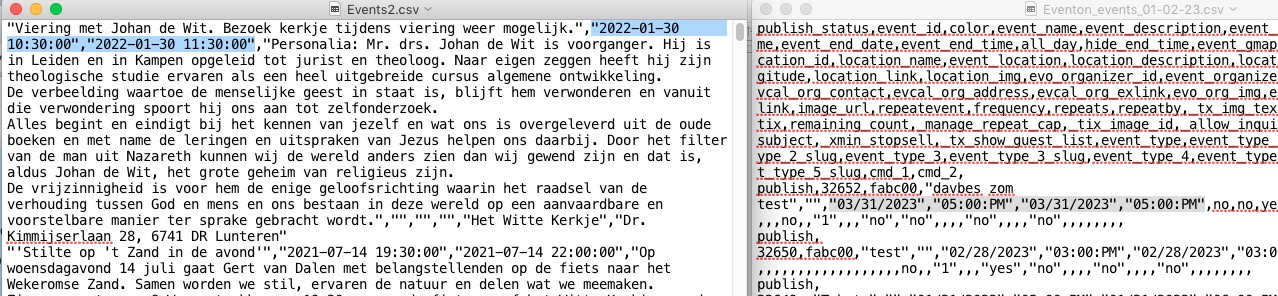
Your .csv file isn’t correct, I am afraid. Please go to EventON > Download all eventON events. > CSV Format.
Make sure to add Column Headers and also change Time and Date formats to
event_start_date & event_end_date – Start/End date in format mm/dd/YYYY
event_start_time & event_end_time – Start/End time in format h:mm:AM/PM
Reply to: tickets(305122)
Hello,
Thank you for your great suggestion, at the moment it is not supported. However please create a new ticket and select Feature Request as category so others can vote on your idea and get it moved into development faster.
Reply to: tickets(305123)
Hello,
Can we please try the instructions mentioned in this documentation to make sure your issue is indeed coming from eventon. It should take less than a minute.
Reply to: tickets(305124)
Hello,
EventON doesn’t have such functionality, unfortunately. However since WooCommerce handles the checkout process, please take a look at this guide:
https://www.wpbeginner.com/plugins/how-to-create-one-time-personalized-coupon-codes-in-woocommerce/
EventON’s Ticket are also Woo’s Products, so maybe you could somehow make this work.
Reply to: tickets(304972)
Follow this to add a button:
https://docs.myeventon.com/documentations/hook-eventtop/
If your contact form can read data from URL, you can attach title and date to a link users to be redirected by to your form.