Sorry, that was my fault. The login name is the same but the password is now: bM237jo%VF%dgWu5GS55oIzX
Replies for tickets on suppota
Sorry, that was my fault. The login name is the same but the password is now: bM237jo%VF%dgWu5GS55oIzX
This code no longer works:
.evors_section.evors_remaining_spots.sec_shade, .evors_section.evors_mincap.happening {display:none !important}
#evorsvp_form p.sin { display: none !important; }
.evors_section.evors_change_rsvp.sec_shade2.mart30 { display: none !important; }
#evorsvp_form .form_row input.name[name=last_name] { display: none !important; } #evorsvp_form .form_row.email { display: none !important; } #evorsvp_form .form_row input.name { width: 100%; }
It’s literally removed all my work… i was just ready to go live… 😭 . 😭 . 😭. 😭

and it has added this to my card view…

I have just updated the plugin and it’s stripped out all my formating…. OMG
Could you update to 4.3.2? To update eventon to latest version: If you are unable to do autoupdate, you can go to codecanyon your account > download and get the latest eventon version as zip file. Then you can go to your website > make sure “Delete eventon settings & data when EventON is uninstalled” is Deslected from eventon settings, delete old eventon, install new one and activate. This link will further explain the process it. Also you can follow us on twitter to get real-time announcements on updates!
“Custom Fonts” has only one font named “TitilliumWeb“, but Appearance has “Open Sans“: https://supspiritsoul.com/wp-admin/admin.php?page=eventon#evcal_002.
Hello,
1. Upload medium font to your website (locally or with a plugin). Make sure to name it FontNameMedium. Now go to EventON > Appearance > add it to Secondary Calendar Font family.
2. Please add this CSS code to EventON > Styles (If you don’t see any change, EventON > Scripts & Styling > turn off Write dynamic styles to header > save settings > turn on Write dynamic styles to header):
p.evo_location_name {font-size: 20px !important} p.evo_location_address {font-size: 20px !important} .evo_metarow_time.evorow.evcal_evdata_row.evcal_evrow_sm p {font-size: 20px !important}
Hello,
Please follow the instructions in this documentation to activate debug in your site to see any PHP errors recorded that can provide insight on to whats going on. Please reply with a link to debug.log file. If you are not able to do this please send us FTP access to your site so we can do this for you.
Hello,
Could you go to your theme’s folder and make sure there is no the custom version of the template?
https://docs.myeventon.com/documentations/customize-single-events-page/
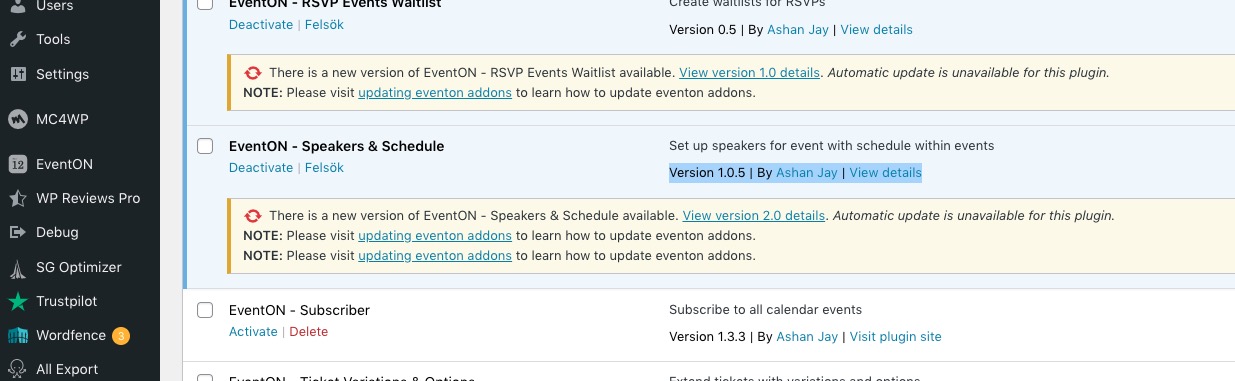
Still says 1.0.5. Could you update? Please also update EventON to 4.3.2.