Hello,
week_style=”1″ is the right option, but you also need to add table_style=”1″:
[add_eventon_wv week_style=”1″ table_style=”1″]
Could you try and let us know?
Replies for tickets on suppota
Hello,
week_style=”1″ is the right option, but you also need to add table_style=”1″:
[add_eventon_wv week_style=”1″ table_style=”1″]
Could you try and let us know?
I dont think this is addressing the issue.
When I hover, the featured image is transparent(thus making the colors appear blur and muted).
Instead, I want the featured image to be 100% opaque, always.
And I want the overlay to be % transparent, until I hover. At which point it would 100% remove the overlay and show the 100% opaque image.
We are glad your issue is resolved, if you have any further questions or concerns please create a new ticket.
If you have a moment, we would greatly appreciate if you could kindly leave us a review at codecanyon! from your account > downloads. Cheers!
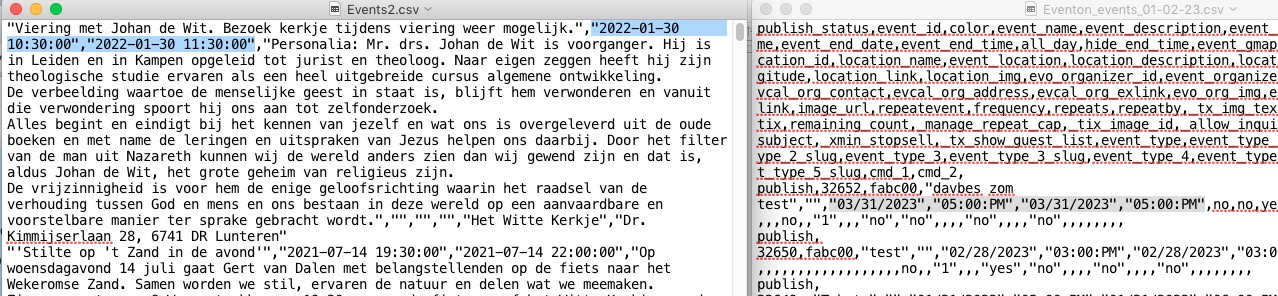
Your .csv file isn’t correct, I am afraid. Please go to EventON > Download all eventON events. > CSV Format.
Make sure to add Column Headers and also change Time and Date formats to
event_start_date & event_end_date – Start/End date in format mm/dd/YYYY
event_start_time & event_end_time – Start/End time in format h:mm:AM/PM
Hello,
Thank you for your great suggestion, at the moment it is not supported. However please create a new ticket and select Feature Request as category so others can vote on your idea and get it moved into development faster.
Hello,
Can we please try the instructions mentioned in this documentation to make sure your issue is indeed coming from eventon. It should take less than a minute.
Hello,
EventON doesn’t have such functionality, unfortunately. However since WooCommerce handles the checkout process, please take a look at this guide:
https://www.wpbeginner.com/plugins/how-to-create-one-time-personalized-coupon-codes-in-woocommerce/
EventON’s Ticket are also Woo’s Products, so maybe you could somehow make this work.
Follow this to add a button:
https://docs.myeventon.com/documentations/hook-eventtop/
If your contact form can read data from URL, you can attach title and date to a link users to be redirected by to your form.
Hello,
None of your Event Locations have Location Address filled in. Please go to https://contrarelogio.com.br/wp-admin/edit-tags.php?taxonomy=event_location&post_type=ajde_events and add Location Address.
Hello,
Please also add eventtop_style=”5″ to your shortcode:
[add_eventon eventtop_style=”5″ show_et_ft_img=”yes”]