Hmmmm Ashan there might be some confusion here with your sales copy
“WishList addon is restricted to logged-in users only to allow you to tract which events each person likes.”
could easily be interpreted as the admin can see what event each user likes- so user 1 likes these 4 events user 5 likes these events and so on
Thank you for your messages, I am going to assign this ticket to Ashan and he will be able to take it from here and find you a solution. Please allow some time for him to get back to you, we greatly appreciate your patience and thank you for being a eventon customer!
That did it! Thanks so much. If it happens again ill clear the caches.
Ashan,
Not sure how to show widgets on Location and Organizer pages:
https://dev2.myeventon.com/wp-admin/widgets.php (added a widget to every section)
No widgets:
https://dev2.myeventon.com/event-location/maultsch-im-gewerbepark-asd/
https://dev2.myeventon.com/event-organizer/1-organizer/
On customer’s website there is Default Widget Area:
https://xzib.com/wp-admin/widgets.php
Mobile view of Organizer page:
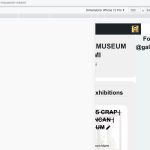
For more info take a look at customer’s message #300947 in this ticket.
Thank you for your messages, I am going to assign this ticket to Ashan and he will be able to take it from here and find you a solution. Please allow some time for him to get back to you, we greatly appreciate your patience and thank you for being a eventon customer! Also please disable any IP blocking on your site if there are any.
Hello,
I don’t see any test login. Could you send it again?
Before updating, make sure to enable Do not delete eventon settings & data when EventON is uninstalled, otherwise you will lose all your events.
Hello,
Please update EventON to 4.2.2.
To update eventon to latest version: If you are unable to do autoupdate, you can go to codecanyon your account > download and get the latest eventon version as zip file. Then you can go to your website > make sure “Delete eventon settings & data when EventON is uninstalled” is Deslected from eventon settings, delete old eventon, install new one and activate. This link will further explain the process it. Also you can follow us on twitter to get real-time announcements on updates!
Hello,
It seems that purging all caches worked:
https://lrgames.fun/wp-admin/admin.php?page=w3tc_dashboard&_wpnonce=f3d32f278b
Could you check?
Hello, having same issue again, when I go incognito mode in chrome (and on my display tv) it is loading only December on the upcoming events page – https://lrgames.fun/upcoming-events