Even after switching to private, it seems to be official for everyone… so I reset the password and would try again with new login data right after this ….
Archives: Replies
Replies for tickets on suppota
Reply to: tickets(298168)
Name: Temporary Login
kontakt@empower-project.de.w01be83b.kasserver.com
PW = VayKT!(1fZPB!C6v63B&RSwD
Reply to: tickets(298550)
I have returned everything in the EventON settings back to the way it was before…
Reply to: tickets(292114)
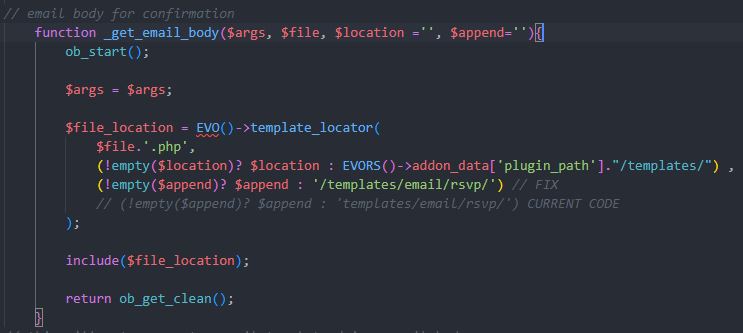
rsvp (eventon-rsvp/includes/class-emailing.php) fix
Reply to: tickets(292114)
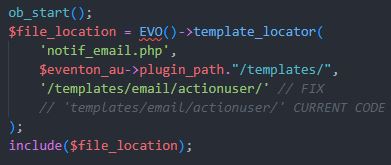
Hi Ashan,
I found a few more templating issues this time with emails from action user (eventon-action-user/includes/class-frontend.php) and rsvp (eventon-rsvp/includes/class-emailing.php). I’ve attached screenshots of the code along with the fix I implemented.
We’re also still having issues with the ‘taxonomy-event_type.php’ file. It’s working fine with the ‘event_type’ taxonomy but not with the ‘event_type_2’ and ‘event_type_3’ taxonomies that we’ve also set up through ‘Categories’ in the EventOn settings. I tried fixing this one too but couldn’t figure out how it was all working.
Thanks,
Tommy
Reply to: tickets(298469)
Hi,
Thanks for your help with this.
Yes, I followed the quick guide you kindly sent and it fixed the issue. But now I came across another problem, which I have shared in a new ticket I just submitted.
Looking forward to your news.
Have a nice day
Reply to: tickets(298522)
sorry but I can´t create events yet.
It doesn´t open the windows
Reply to: tickets(298520)
Ok,
Is this plugin could do the job ? Because I want that the user has to do itself.
https://woocommerce.com/products/customer-order-cancellation-for-woocommerce/?quid=b0363af4cbd19c3d8492a29d1a61646d
This plugin can cancel an oder in My Account. But also in Event tickets ?
Reply to: tickets(298516)
Hi,
I found the issue with the event image myself. I just added pec=”cd”to the shortcode.
So … if we could have pagination, my customer and myself … we would be really thankful 🙂
Best,
Martin
Reply to: tickets(298516)
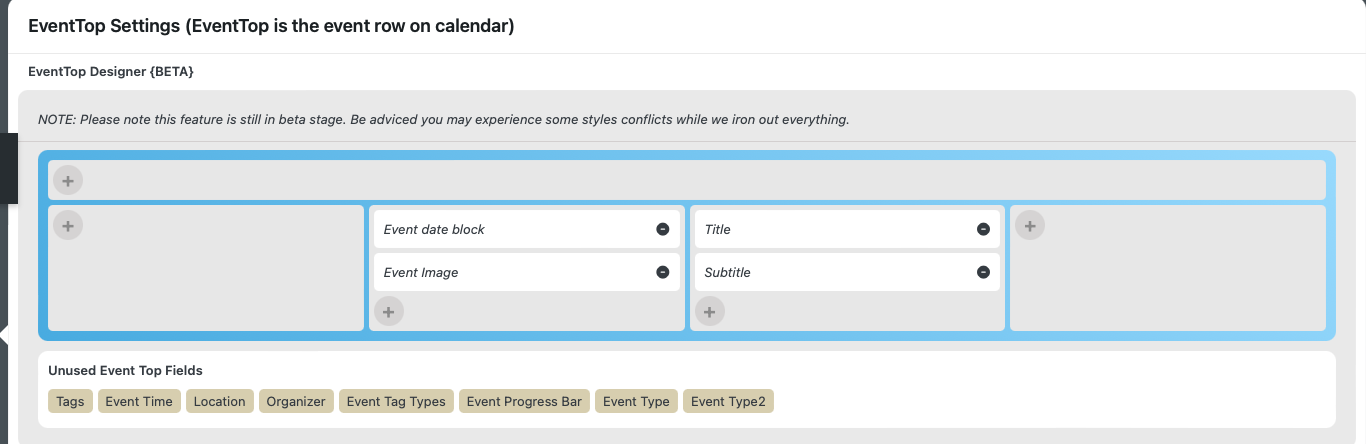
Hi,
I changed number_of_months=”24″ to number_of_months=”20″
Also I moved the EventImage (from the first) to the second column (see screenshot attached)
Thy and best,
Martin