having total cache and autopmize togeather can cause conflicts if both are set to minimize files
Archives: Replies
Replies for tickets on suppota
Reply to: tickets(296591)
having a look over this speed test https://gtmetrix.com/reports/uu-naples.bricktoweb.com/9VjfdtOe/
can we deactivate temporarily your cache plugin and autoptimize plugin and make changes to it?
Reply to: tickets(296593)
well yes My idea above can work (I then go into events list and items BUT turns out the events list and items addon wouldn’t do what you need) but the first part of the video would work
Reply to: tickets(296593)
Theres no code that can say “show all the speakers”
however you could create an event- set the date to say october 2030 and add all speakers to that event
then add that event to a page using the single event shortcode- and then with some css we could make everything else vanish from the event
(thats provided your theme/page builder can add css to a page that only effects that page) I don’t recall that ever being done before but I am sure that most of the event can be made to vanish with css and I’d be willing to give it a go to make- let me test it out on the dev site first will post a reply in a moment
Reply to: tickets(235122)
In other words, it cannot be imported from facebook calendar
What solution do you have so that I can directly import the facebook calendar or other solutions that allow me to synchronize the calendar from facebook ?
I asked another question that you didn’t answer:
Do you have a deadline for Ticket #286218 ?
Reply to: tickets(296071)
That should be fine to use to login to the website. You can then go to the dashboard once you’re logged in.
Reply to: tickets(296074)
Fixes the list of events and the single page event display. Now, the lightbox display of the event has a gray date. See attached PDF.
Also, in response to your answer on stacking, why couldn’t you add a token in the EventTop designer that expands to the time and location tokens when the code evaluates it. You would then be able to retain the appearance you had before.
Reply to: tickets(296154)
Ashan,
Please take a look at
[Replyto/296404]
They have the latest version of RSVP add-on.
Reply to: tickets(296154)
Great! Sorry for the inconvenience. I am going to assign this ticket to Ashan and he will be able to take it from here and find you a solution. Please allow some time for him to get back to you, we greatly appreciate your patience and thank you for being a eventon customer! Also please disable any IP blocking on your site if there are any.
Reply to: tickets(235122)
Google’s file timezone is UTC: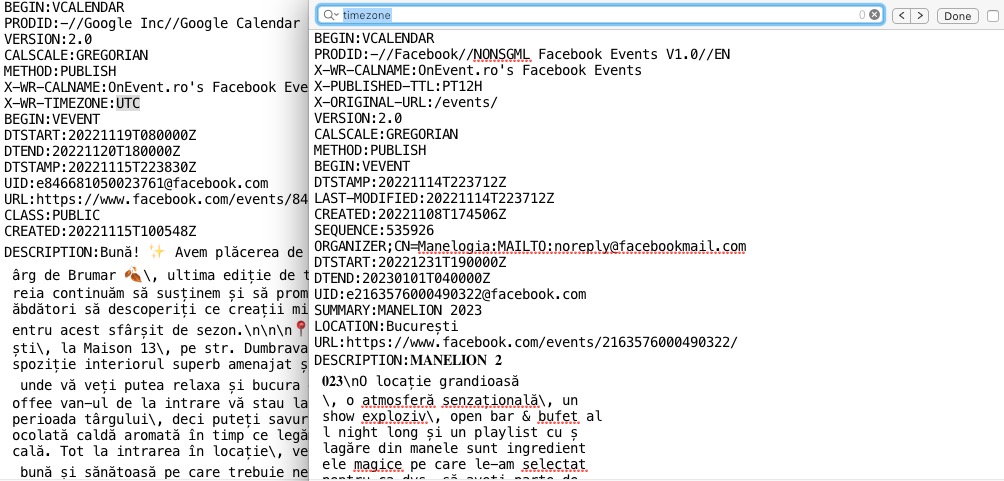 Facebook doesn’t have any timezone included.
Is it possible to make sure that the file contains the timezone in the following format: