Please add this to the shortcode:
hide_month_headers=”yes”
Replies for tickets on suppota
Please add this to the shortcode:
hide_month_headers=”yes”
The issue is with memory limit:
[23-Nov-2022 22:54:42 UTC] PHP Fatal error: Allowed memory size of 536870912 bytes exhausted (tried to allocate 263053312 bytes) in /nas/content/live/marianshrine/wp-content/plugins/eventON/includes/class-evo-ajax.php on line 348
Please follow:
https://docs.myeventon.com/documentations/increasing-wordpress-memory-limit/
You can also go to https://championshrine.org/wp-admin/admin.php?page=eventon > select a different Select event calendar WP Query method.
Hello,
To show past events, please follow
https://docs.myeventon.com/documentations/how-to-show-past-events/
Please add this CSS code to EventON > Styles (If you don’t see any change, EventON > Scripts & Styling > turn off Write dynamic styles to header > save settings > turn on Write dynamic styles to header):
#evcal_widget #evcal_list .eventon_list_event .evcal_list_a, .widget-area .ajde_evcal_calendar .eventon_events_list .evcal_list_a { flex-wrap: nowrap; gap: 10px; }
To change the Event Top background please go to https://dai-sport.dk/wp-admin/admin.php?page=eventon&tab=evcal_1#evcal_004aa > change to Select Default Calendar EventTop Style to Clear with left border colors and gaps.
Hello,
Please add this CSS code to EventON > Styles (If you don’t see any change, EventON > Scripts & Styling > turn off Write dynamic styles to header > save settings > turn on Write dynamic styles to header):
@media screen and (max-width:960px){ .ajde_evcal_calendar.boxy .eventon_list_event.hasbgimg, .ajde_evcal_calendar.boxy.boxstyle1 .evo_boxtop, .ajde_evcal_calendar.boxy.boxstyle2 .evo_boxtop { background-size: contain !important; }}
Hello,
Your current EventON is Lite. Please purchase a full version from
https://codecanyon.net/item/eventon-wordpress-event-calendar-plugin/1211017
FullCal works with full version only.
My faebook calendar is https://www.facebook.com/events/ical/upcoming/?uid=100072261342209&key=b2iHGfdm5YTXDRF6
How could I import the events in ICS format so that I can synchronize them daily ?

My google calendar is https://calendar.google.com/calendar/ical/ba8r83n0b1s8gjhqiksk036rhrj4la3k%40import.calendar.google.com/public/basic.ics
If I use the Google calendar, I don't have the link event, nor the organizer
Hi Jordan,
If you are referring to the main Eventon plugin, please contact Envato, they should be able to help.
I have updated the Full Cal and Weekly view Add-ons.
When I initially deleted the add-ons, it didn’t affect the integrity of the events I am using at all. This leads me to believe this may not fix the issue.
Are you able to look into the problem for me? It is odd that only certain shows are disappearing before they even begin?
Thanks
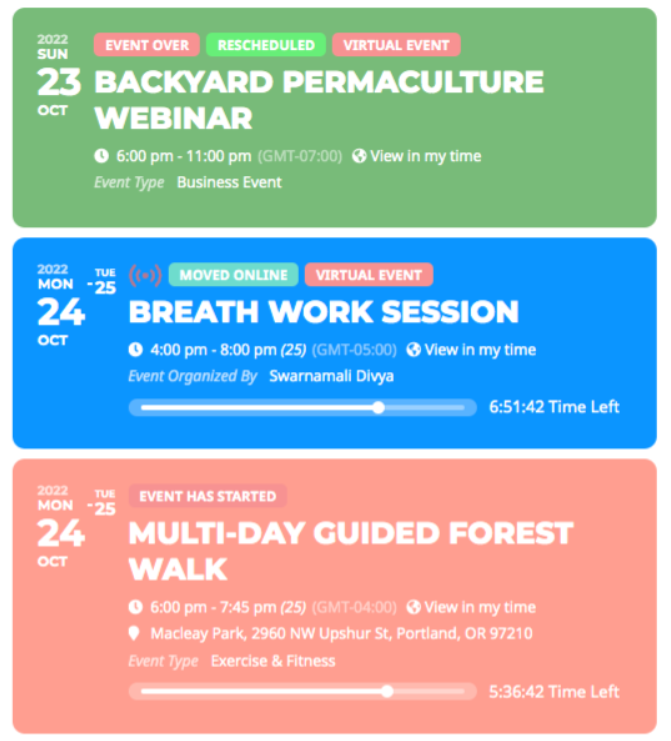
Hi Artem
I don’t know much about coding, so all code in the style tab has been written by someone from your helpdesk, and I do unfortunatly not know what code affects what.
We have decided to hopefully make things a bit less complicated by just using your standard look for the calendar/event list but with different fonts. So now I have deleted (and saved offline) all the code in the style tab. I would have guessed that the EventTops would now look as the attached calender from Eventons frontpage, but the font sizing, spacing and so on are very different, and I can’t find anywhere in the menu’s to change it. Does it require a lot of code to make it look like that?
Regards
Mikkel