Ashan,
Not sure how this works. Could you help?
Replies for tickets on suppota
Ashan,
Not sure how this works. Could you help?
Thank you for your messages, I am going to assign this ticket to Ashan and he will be able to take it from here and find you a solution. Please allow some time for him to get back to you, we greatly appreciate your patience and thank you for being a eventon customer! Also please disable any IP blocking on your site if there are any.
We are glad your issue is resolved, if you have any further questions or concerns please create a new ticket.
!!! Also, after the update please follow this guide:
https://docs.myeventon.com/patch-fixes/unable-to-select-locations/
We are glad your issue is resolved, if you have any further questions or concerns please create a new ticket.
If you have a moment, we would greatly appreciate if you could kindly leave us a review at codecanyon! from your account > downloads. Cheers!
That’s true. I thoght that the lat/long values were in, because the location is shown in the event page.
Now is working.
Apologies and thanks!
There was a typo. Should be evcal_functions.
Please check now.
This second location doesn’t have Lat/Long values added:
https://lideresasamazonas.org/wp-admin/term.php?taxonomy=event_location&tag_ID=247&post_type=ajde_events&wp_http_referer=%2Fwp-admin%2Fedit-tags.php%3Ftaxonomy%3Devent_location%26post_type%3Dajde_events
Could you go there and add them?
Dear Artem,
we try again to explain the problem with the “webhook”:
1. we work with the payment provider “Digistore”.
2. we would like to use the ticket system (EventOn)
3. we would like to connect the ticket system with Digistore and for this we need the interface with Zapier (according to Digistore)
4. Zapier needs the possibility to set a “webhook”.
5. the webhook must be able to send and receive.
How is this possible?
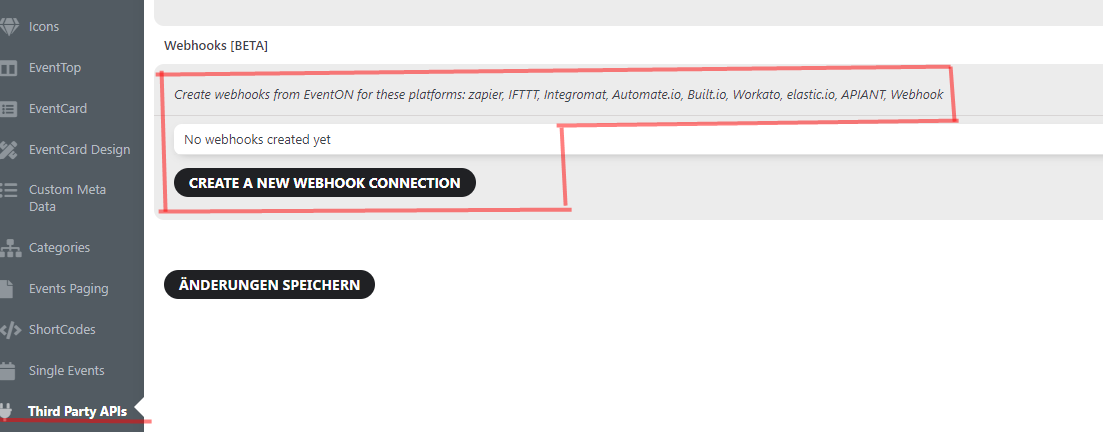
We have the idea that we could possibly use the beta version (see screenshot) for this. Unfortunately this is not active at the moment.
Is there an addon for this?
Once we have solved this problem we would then decide to purchase the ticket system, but unfortunately this is dependent on a solution with Digistore!
When planning an online event including a ZOOM link the download of the ics file don’t show the ZOOM link in the right place in the calendar.
Ashan is still working on this:
Sorry for the misunderstanding. We do not have a solid solution at the moment to provide a zoom link to an ICS file ( which is the most recognized file accepted in add to google calendar)
We are working on discovering a solution, once we have something tangible we will share with you! Much appreciate your patience!
Ah, not true what I’m saying. Obviously it saves changes but does not show anything that indicates that changes haven saved successfully.
Thank you for your messages, I am going to assign this ticket to Ashan and he will be able to take it from here and find you a solution. Please allow some time for him to get back to you, we greatly appreciate your patience and thank you for being a eventon customer! Also please disable any IP blocking on your site if there are any.