Sorry,
We tried the code snippet, but unfortunately it did not bring any change. See screenshot (Image)
Thanks
Replies for tickets on suppota
Sorry,
We tried the code snippet, but unfortunately it did not bring any change. See screenshot (Image)
Thanks
Try this!
https://espressomedia.se/wp-login.php
I can not fix FTP access before tomorrow 🙁
Thank you!!
Please send us FTP access to your site as a private message, so we can perform several tests from our end and resolve your issue fast!
Your website link + /wp-admin redirects me to 127.0.0.1. Could you check?
If you want to stop selling tickets, then you need to enable Manage capacity seperate for each repeating event and then put 0: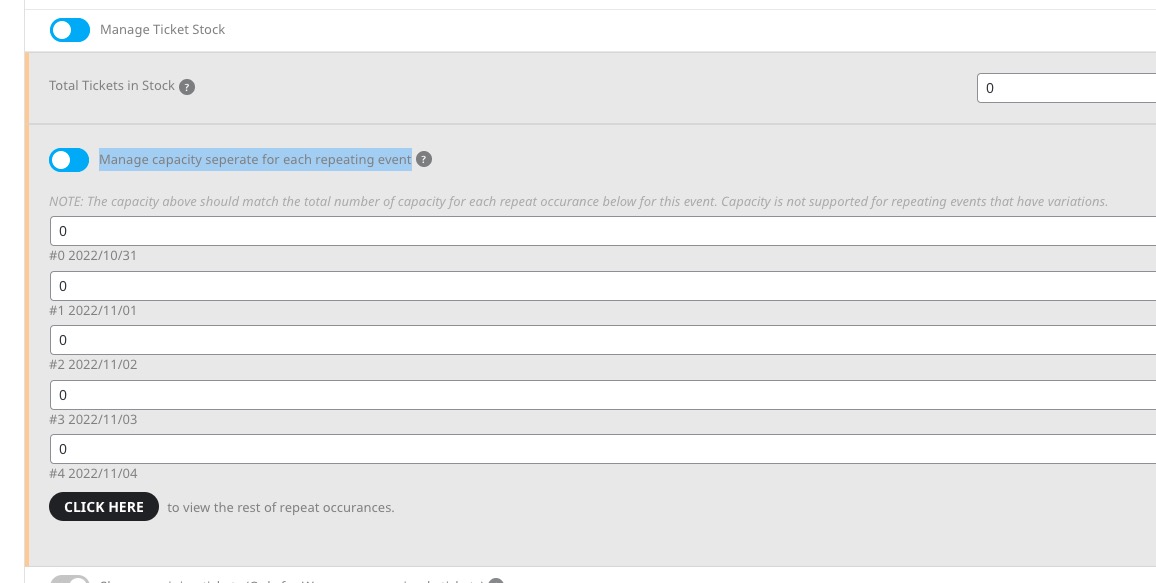
Repeat Customizer doesn’t allow you to make repeats sold out.
Yes please do that. I tried and got an Critical Error 🙂
https://espressomedia.se/wp-admin
EVENTON
aZ@Po)nQ5Q&&&
Ashan,
Go to https://pseudocode.com.au/wp-admin/post.php?post=15448&action=edit > open RSVP Attendees List:
Oct 25 and Nov 8th show the same events:
https://pseudocode.com.au/wp-admin/edit.php?post_type=evo-rsvp
You are exactly right!
Thank you for your messages, I am going to assign this ticket to Ashan and he will be able to take it from here and find you a solution. Please allow some time for him to get back to you, we greatly appreciate your patience and thank you for being a eventon customer! Also please disable any IP blocking on your site if there are any.
Could you update EventON to 4.2 and check if it helps?
After the update please apply this patch fix:

To update eventon to latest version: If you are unable to do autoupdate, you can go to codecanyon your account > download and get the latest eventon version as zip file. Then you can go to your website > make sure “Delete eventon settings & data when EventON is uninstalled” is Deslected from eventon settings, delete old eventon, install new one and activate. This link will further explain the process it. Also you can follow us on twitter to get real-time announcements on updates!