Hello,
The way it shows the calendar on the page is Regular Design.
It’s just very similar to Tile Design when you select EventON > EventTop > Select Default Calendar EventTop Style: Colorful with gap between events.
Please try selecting “Clear with left border colors and gaps”.
Thanks Artem. On no. 1, what I see is that I had renewed my subscription on Oct 2024, so I guess that means I have until this coming Oct 2025 before I renew. Can you confirm this? What subscription do you see then that “must be renewed”?
On no. 2, yes, got it.
Thanks, I await your news!
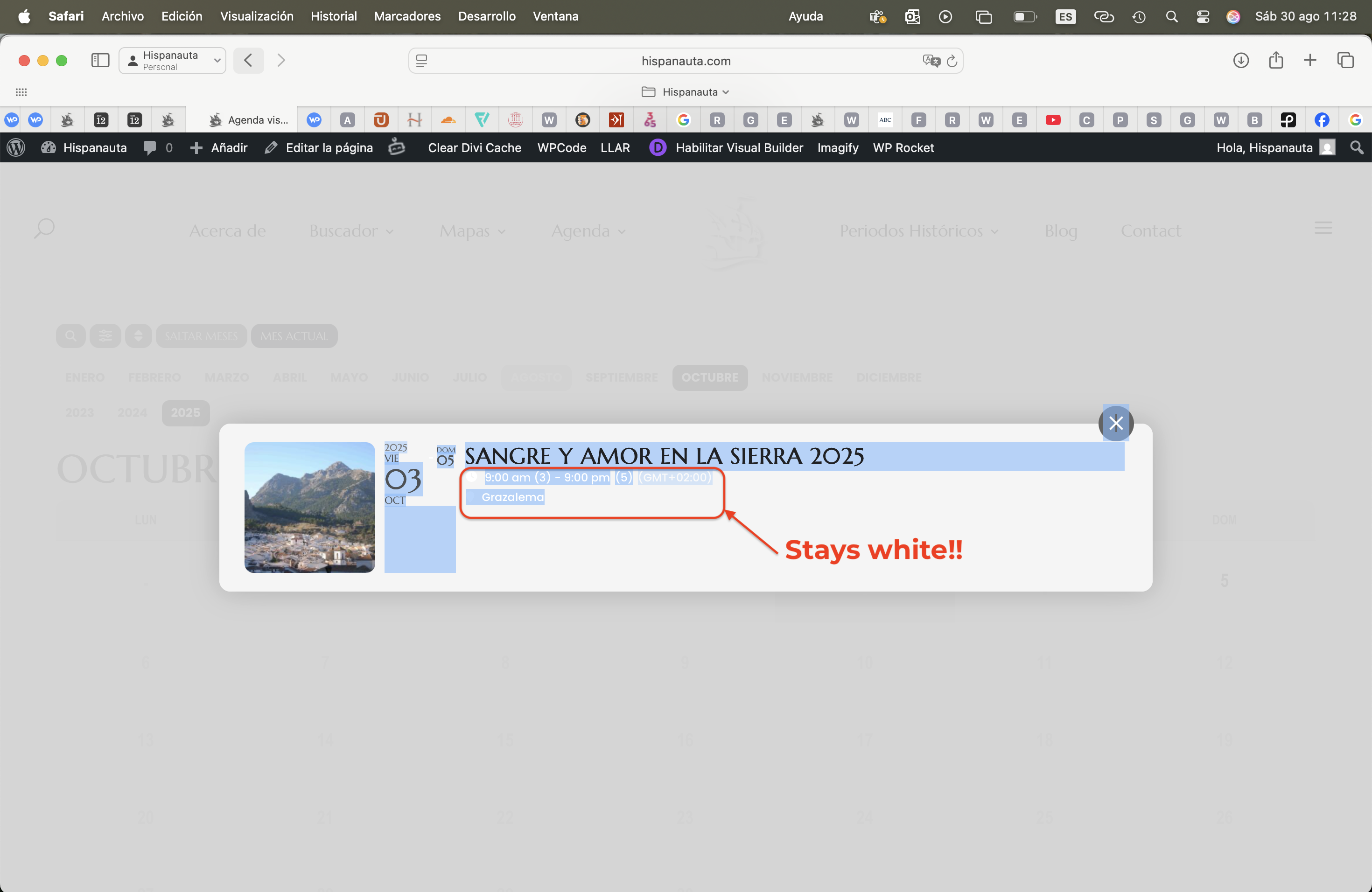
Hello Artem, I remember you, looks like you’re still around :). Thanks for responding. I’ve tried the above, but it still doesn’t work. It’s strange. All text in the top section of the event card is set to a dark color, but the time and location are still showing in white on this MODAL. NOTE: the screenshot you sent me is not the one! When you click on the date, it shows a preview of the event below the calendar. It works there. But on clicking the date ALSO opens the event topcard in the middle of the screen, which is the screenshot I had sent you (I’m attaching it again). That’s where it DOESN’T work.
Look forward to your feedback. I’ve just tried again three times, clearing caches, using the write dynamic styles to header option, etc. But to no avail……
HELP!
(all my event has same time zone) I think issue does not matter, since Its used for a locally used app. So was just me freaking out, when trying to check the app from another timezone.
Yes, WP admin and evwnt on time setting are same city, Copenhagen. Where is “Edit Event, Timezone” ?
No, I can’t see any more errors in the debug log now.
We are glad your issue is resolved, if you have any further questions or concerns please create a new ticket.
If you have a moment, we would greatly appreciate if you could kindly leave us a review at EventON WordPress Page OR Codecanyon. Your review helps us a lot in continuing EventON improvements!
Could you go to EventON > Time Settings > make sure that Default Event Timezone is the same as wp-admin > Settings > Timezone?
The same with Edit Event > Timezone.
Hello,
Thank you for your great suggestion, at the moment it is not supported. However please create a new ticket and select Feature Request as category so others can vote on your idea and get it moved into development faster.
Could you contact the plugin developer, show them this screenshot
https://dev2.myeventon.com/surl/SYEAkLHyFBgd
and ask about how it’s possible to exclude EventON from their plugin?