Arrr ok, thanks for coming back to us.
Archives: Replies
Replies for tickets on suppota
Reply to: tickets(281609)
Perfect! Please also note that you can apply this patch:
https://docs.myeventon.com/patch-fixes/4-1-in_array-error/
Reply to: tickets(281854)
When you find a new issue, please always create a new ticket.
I can`t find anywehere, at which URL or setting, could I change the name of the DAYS ( S M T W T F S ) to SPANISH ( D L M M J V S) in the YEAR CAL VIEW addon, for example at:
Please go to https://calendario.elcampo.com/wp-admin/admin.php?page=eventon&tab=evcal_2 > Months and Dates > m t w t f s s.
I can´t get this VIEWs with any shortcode generated and pasted on my pages, and I really want them to be displayed at my site, here is what I am looking for:
Could you go to https://calendario.elcampo.com/wp-admin/admin.php?page=eventon&tab=evcal_1#evcal_002sc > disable Disable Moment script? Also try disabling “Disable Jitsi script” and “Load eventON scripts and styles only on eventON pages”.
…and click on NEXT ARROW to see NEXT MONTH events, and NOTHING is loaded.
Please try the previous instruction.
Reply to: tickets(281508)
EventON doesn’t have the subscription events functionality in any add-ons, unfortunately.
Reply to: tickets(282661)
I cannot find Event Slider https://www.myeventon.com/addons/event-slider/ among your purchases.
Are you using this slider: https://codecanyon.net/item/eventon-slider-addon/11063359
If so please contact them, since unfortunately, it’s not our product.
Reply to: tickets(283067)
Ashan will include the fix in the next version of the plugin.
We are glad your issue is resolved, if you have any further questions or concerns please create a new ticket.
If you have a moment, we would greatly appreciate if you could kindly leave us a review at codecanyon! from your account > downloads. Cheers!
Reply to: tickets(283315)
Please go to Edit Order > set Status to Hold;
Press “Add product(s)” > type in “sku” of the product you want to add:
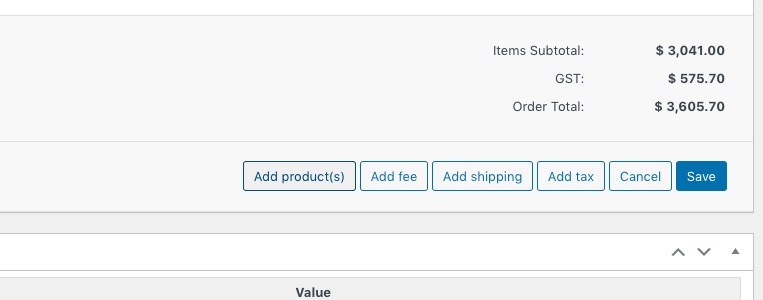
Press “Edit Item”:

Press “Add Meta” and add Event-time and seat:

Please note that these changes will not affect EventON’s event, only Woo’s order.
The easies solution is to cancel the existing order, purchase a new order with customer’s info through the regular checkout process.
Reply to: tickets(283484)
Hello,
Where can we take a look at the snippet?
Please add it to
https://blackwomenbuild.org/wp-admin/theme-editor.php?file=functions.php&theme=thegem-elementor-child
Make sure to comment so we can uncomment and test it.
BUT I can only see the (restored) default date formatting when I am logged in!
Make sure to clear your cache (plugin + browser).
Reply to: tickets(283523)
Hello,
You can either apply this patch:
https://docs.myeventon.com/patch-fixes/4-1-in_array-error/
Or go to EventON > EventTop > EventTop Main Day block fields > enable Event Day Name or any other you like.
We are going to include the fix to the next version.
Reply to: tickets(283396)
Please add this CSS code to EventON > Styles (If you don’t see any change, EventON > Scripts & Styling > turn off Write styles to header > save settings > turn on Write styles to header):
.evcal_evdata_row .evcal_evdata_cell h3, .evo_clik_row .evo_h3 { font-size: 10px !important; }