Sorry for the delay in getting back .Kindly use coupon code EVO20T at the checkout and that will get you 20% discount on all addons in the checkout for the first year.
Archives: Replies
Replies for tickets on suppota
Reply to: tickets(385128)
Sorry for delay in getting back. Kindly update to the latest version of Event Maps addon 1.6.1 — should resolve this.
Reply to: tickets(374792)
With latest versions of tickets and variations are you still experiencing the same issues?
Reply to: tickets(389550)
Dav, how does your event organizers see the participants list on frontend? Are you using actionUser event manager or how exactly are they seeing this?
Reply to: tickets(389099)
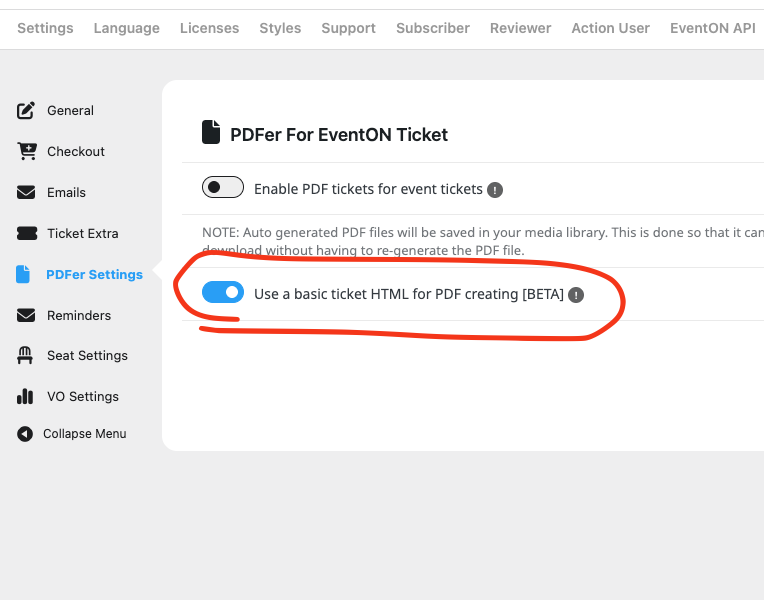
Just following up, the latest version of PDFer addon has an option to use basic ticket HTML to generate PDF which will stop that error from coming up. If you get a chance please give it a try and see if that will work for you without errors.
Kind Regards!
Reply to: tickets(391921)
Do you feel comfortable sharing wp-admin access via our secure “Access info” and we can take a look to see why it is loading and not doing anything else.
Reply to: tickets(394308)
You are running EventON 4.9.10 we have added more accessibility elements to calendar in version 4.9.11 please update to the newext version of EventON. Also we are about to release the next version of eventON which will further introduce more accessiblity supported elements into calendar.
Reply to: tickets(392048)
Mind sharing the updated wp-admin login info and I can see why that shortcode is not working on your website — which works perfectly on our end. Thank you!
Reply to: tickets(394249)
Hi also this part is odd, the copy is all stucked into the left column: https://www.loom.com/share/d675d5fc4e1f4f7faadd71f3e9fdca26?sid=48eb948d-9150-4e82-8e06-eb9aa7b53773
Reply to: tickets(394539)
How can I create translated versions of each event, including the schedule and event details?
Once logged in, I navigate to https://raktn.org/wp-admin/admin.php?page=eventon for each event.
I’ve noticed that both English and Arabic versions are displaying in RTL (right-to-left), whereas only Arabic should be RTL. I’ve just disabled the “Enable RTL for all EventON calendars” setting to correct this.
However, I still do not fully understand the process for creating and managing translated versions of events. I would appreciate your guidance on how to properly configure this.
Let me know if you’d like to include screenshots or technical details to make your support request even clearer.
English Page: https://raktn.org/2025-symposium/|
Arabic Page:https://raktn.org/ar/2025-symposium/