Unfortunately, it doesn’t. It’s a separate add-on that allows users to sign-up to events for free.
Archives: Replies
Replies for tickets on suppota
Reply to: tickets(277291)
Or I need the sidebar working or I need the pop up working. Pop up does not show video. Just if I resize the window it appears. That would not be a solution…
Can we try the instructions mentioned in this documentation?
Sidebar. Please add this CSS code to EventON > Styles (If you don’t see any change, EventON > Scripts & Styling > turn off Write styles to header > save settings > turn on Write styles to header):
@media (max-width: 568px){ .evcal_eventcard .evcal_evdata_row .evcal_evdata_cell { margin-left: 0px; }} @media (max-width: 568px){ .evcal_eventcard .evcal_evdata_cell .evo_h3, .ajde_evcal_calendar #evcal_list .evcal_eventcard .evcal_evdata_cell_title, .evo_pop_body .evcal_evdata_cell_title { padding-left: 0px; }}
Reply to: tickets(278103)
Events are visible on small screens: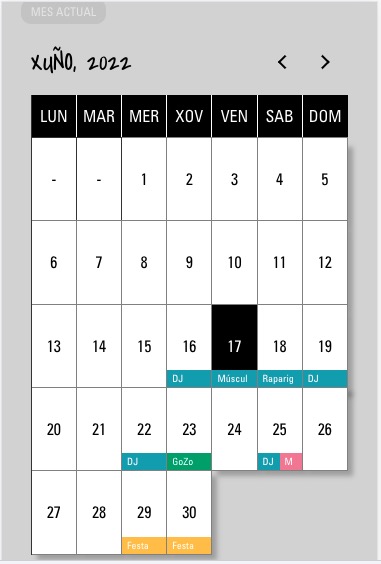
Could you send us a screenshot?
Reply to: tickets(278139)
Hello,
Thank you for your great suggestion, at the moment it is not supported. However please create a new ticket and select Feature Request as category so others can vote on your idea and get it moved into development faster.
Reply to: tickets(278139)
Hi there –
I mean – all events are open in the CURRENT month, but all of the other events just show the event tops.
For example, since we are currently in MAY, the MAY events would be expanded but all other months would just show event tops. And if a user clicks the “top” of a closed month, the events of that month would then expand.
Thanks
Jason
Reply to: tickets(278139)
when you say expanded- do you mean all events are open in the first month? but the other events just show the event tops?
of the first month as it is and they then shows a list of month names that they click on to open the events?
I am a little confused by your use of expanded
Reply to: tickets(278142)
event_count=”1″ number_of_months=”1″ show_upcoming=”1″ number_of_months=”1″ hide_past=”yes” does not work in events now calendar
it would be handy to see the site- hard to vidualize the issue without seeing it
Reply to: tickets(277864)
or https://xzib.com/exhibitions-in-chelsea/
or even or https://xzib.com/latest-exhibitions-in-chelsea/
whatever people are typing into google
Then I would make the header the same text and make it H1 tagged so google knows- a short SEO’d paragraph and then the calendar
perhaps a side bar with links to other locations
Reply to: tickets(277864)
If I was doing it I would make the URL what they type into google to search for what you offer
https://xzib.com/chelsea-exhibitions/
You can use event types for locations because the locations will give individual locations like if there were 200 events in Australia the locations drop down would have 200 options
but if you broke it down using event types people could search the states NSW, victoria, queensland and see 50 events in Victoria for example
using locations is good if you are in one state, but if your events are country wide then event type locations allows you to control that alot better.
if you have many events in one area the event type method is the way to go.
I think you are better off using the single event template created by google- now when you change it- it can take 2-4 weeks for google to change- its not instant
Reply to: tickets(278023)
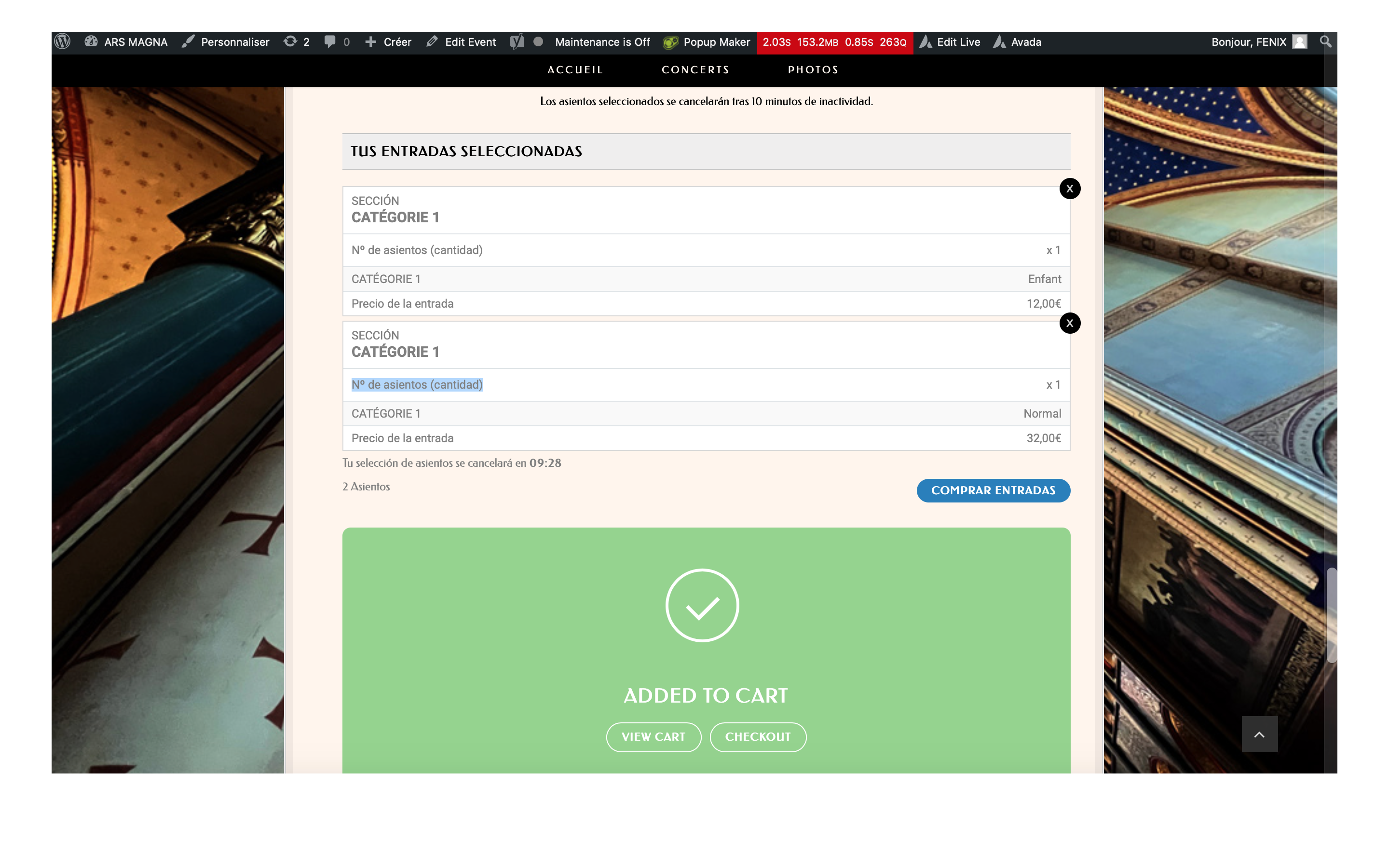
Oh my god! More others strings appears as not translated to french (L2)!
– TUS ENTRADAS SELECCIONADAS
– Nº de asientos (cantidad)
– SECCIÓN
– Precio de la entrada
– Tu selección de asientos se cancelará en
– 2 Asientos
– COMPRAR ENTRADAS
– ADDED TO CART
– VIEW CART
– CHECKOUT
And in the check out page items:
– Event Time
– Event Location
– Unassigned Seating at
– Base price
– Variations for ticket
Please, it is very urgent, there are few days left until the concert and we need to sell tickets.
Thank you