Also, Dave
Where do I change the slug “event-type”
Im wanting to change that to say “exhibition.” But I cant identify where to change it.
https://xzib.com/event-type/chelsea
Replies for tickets on suppota
Also, Dave
Where do I change the slug “event-type”
Im wanting to change that to say “exhibition.” But I cant identify where to change it.
https://xzib.com/event-type/chelsea
Hello,
Regarding the two Calendar and Google Cal sections, you can remove one of them by going to Eventon > Settings > EventCard Design
As for the issue caused by the Avada Fusion Builder, unfortunately, we are unable to provide support for issues caused by third-party themes or plugins. As they are not our products, we are unaware of how they have been programmed or how it is supposed to work. As such, we recommend you to contact the theme or plugin developer and ask them for their assistance in solving the problem. Let us know if you need help with anything else.
Hello Jaz,
Please take a look at https://docs.myeventon.com/documentations/terms-and-conditions-and-refund-policy/ > 7. Subscriptions & Automatic Renewal > 7.4 Subscription Refunds.
A renewal reminder mail was sent before the charge was made. We had given you the opportunity to cancel. Please go ahead and cancel the renewal so that you are not charged again.
Here is a tutorial on how to do that
https://docs.myeventon.com/documentations/how-to-cancel-addon-subscription-before-auto-renew/
Also even with classic editor disabled, this is still not working.
https://dev.seeoptometry.com.au/events
by adding this to
appearance>>>>customize>>>>additional css
.ajde_evcal_calendar.sev #evcal_list .eventon_list_event {
border-radius: 0;
}
.ajde_evcal_calendar.cev #evcal_list {
border-radius: 0;
}
We are glad your issue is resolved, if you have any further questions or concerns please create a new ticket.
Also there are two of these for some reason.
https://prnt.sc/4cGxZfX5Cilr
debug is not turned on and the error still occurs here:
https://dev.seeoptometry.com.au/events/primary-eyecare-for-gps/
define('WP_DEBUG', false);define('WP_DEBUG_DISPLAY', false);Hi –
I have whitelisted your ip and added updatedEvent Lists: Ext to 0.22.
As I mentioned, I changed my EventON Version 4.0.6 Plugin folder name to EventOn_old in my cpanel which allowed for the site to come back up. The EventON Version 4.0.6 Plugin is deactivated.
I appreciate your fast response and help getting my calendars back up.
Thanks.
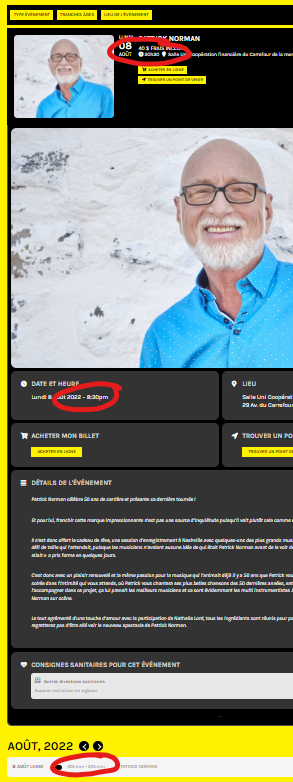
Hello,
Thanks for the update on the ticket but, I just want to point out that your plugin, on the same page, does show three separate ways for time. Please see screenshot.
So, I think the code at the core for time display should be look at it again for a futur version. We won’t be able to launch our website if you display times in three different ways. Customer don’t get it that the time is show 3 times on the same page but differently.
Thanks,