Hi! Centering the title works well in the 1st day event tiles but not in the other events so I think we have to lose it unfortunately. But the bigger font is super (it’s slightly too big though) and it’s great getting rid of the parentheses.
I have to say, you have already accomplished more than I thought was possible so thanks for that!
That should work but its not connected to the tickets addon so you would have to keep track of who has bought what ticket for what event
its designed for small business who only put the one event on here and there. you would then get an email from paypal saying “you’ve got funds” its OK if you are running 1 event but if you are running multiple events per month then Not recommended. as its too much to keep track of who has paid for what- it means more time sitting front of the computer with an excel sheet trying to figure in who has paid
for a multi vendor system
you could (i hate to upsell you) use action user addon combined with tickets and
https://wordpress.org/plugins/dokan-lite/
and this would allow you to do what you seak- HOWEVER the payments with Dokan light are not automatic with the free version (you have to fork out an arm and a leg for that functionality)
but with Dokan light- the other people make a request for money and you tick a box to pay them- its an extra step but then the tickets addon will work right and you can track the orders for each event
(action user will also allow (if you want to) your other users to submit events from the front end and it automatically connects that event to them for payments)
I built a website using dokan, action user and tickets to automate people adding events and selling their own tickets
if you can get a refund on the angel eye plugin and spend it on action user I can help you set that up- and at the end if you don’t like it- you can then get a refund on the action user
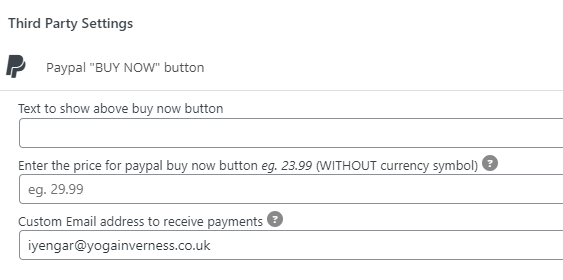
Thanks for all your support, I totally understand that the Angelleye plugin is not your responsibility or experience. If I deactivated that plugin altogether, and just used a third party paypal address for the events that need it, would that work (see the screenshot) or do I need another EventON addon to get that to work?
So I have made some more changes to the 1st day events titles
see video
hope you don’t mind- so I have also centred the event title- I can remove that easily if you don’t like it
Great! Only thing missing is that the date doesn’t align perfectly in the x/y dimensions (it’s closer to the top than to the left) and that the subtitle and time is a little bit too high.
Can I fiddle around myself and try to make it perfect? Did you change this in the styles panel or somewhere else?
All best,
Peter
do you have wordfence running and somehow blocked yourself or you IP address
it would be handy to see the backend because I can only guess from looking at the front end
Well, that’s crazy! Unfortunately I logged out, closed browser, and same thing still happened — it just constantly redirects to the /null for some reason and makes me hit the back button, both front end and back end. The only CSS change I made was to add padding around the calendar, I deleted that, and it still doesn’t work. This is frustrating if you can’t reproduce it! (Note, this time I also tried it in Microsoft Edge, and got the same error — so that’s Chrome, Safari, and Edge all doing the same weird thing.)
Hi again Dave,
this looks so good!! We will for sure use this tile style 1 since it’s now really convincing!
It would be really nice to have the date in the upper left corner if that’s ok? It does not have to be larger.
Is it at all possible to make the lower coloured field a little bit lower (30% or so)? The distance between the base and the time is a tiny bit disturbing.
Finally, is it possible to hide the parentheses and clock icon on the coloured tiles that represent the individual days (Torsdag, Fredag, Lördag, Söndag x juli, etc)? Do we maybe need to hide the clock icon on all tiles to achieve that?
Many thanks!
Peter
There are multiple views to the full cal and you can edit events by activating
in myeventon>>>>settings>>>>>event top – show edit button which will alllow you to quickly edit any event from the event top.
Theres 3 views
straight out grid calendar
events on the right hand side of the grid calendar
and putting the event names on the date tiles (restricted to displaying 2 events in this mode)
if you can provide us your calendar page and wp-admin access we can create a video showing you how to use it
please list all the issues you have with it