Staging Site:
https://devlp.laboratoriodeperiodismo.org/
https://devlp.laboratoriodeperiodismo.org/wp-admin
Same username and password as in the production website
Replies for tickets on suppota
Staging Site:
https://devlp.laboratoriodeperiodismo.org/
https://devlp.laboratoriodeperiodismo.org/wp-admin
Same username and password as in the production website
Thanks for your help! I was able to change the subtitle too.
Please close the tix.
you have Autocomplete WooCommerce Orders deactivated at the moment is that deliberate?
so when they make an order you have to manually complete the order- so the processing email gets sent out
Hi guys
Had an idea – can we find this text:
Number of Event Submissions included
and change it to
Includes
That would fix the problem. I am trying to find itmyself meantime.. will update if I do
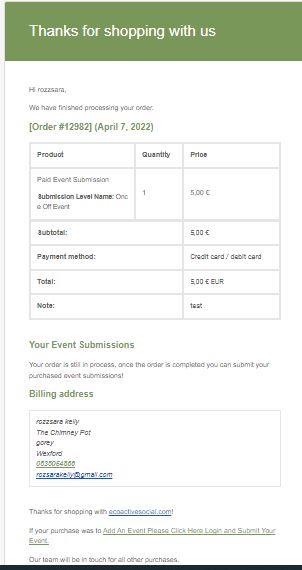
HI guys
re removing this line on all order emails:
Your order is still in process, once the order is completed you can submit your purchased event submissions!
This HAS to be possible ! Can’t it be done via the https://docs.myeventon.com/documentations/how-to-additional-data-to-confirmation-email/ with some sort of code to negate that piece of text?
Please help – this is REALLY confusing for the customer who has paid and order complete yet is still being told that is in process. I have added seperate info for them in the woocommerce email itself. But this piece of text is 100% EventOn made.
see latest email that customer gets with both my message ( great) and the default eventon one ( not great)
I tried this to no avail ( in case it helps)
@media only screen and (max-width:768px){
.evoaup_slevel .slevel_details {
display:inline;
}
.evoaup_slevel .slevel_details:after {
content:”a”;
white-space: pre;
}}
Hi guys
I will continue playing around with that code but it doesnt seem to be working – is there css to add a line break instead maybe?
Understand you are off the weekend as am I for once whoop whoop! hope its a good one for ya!
Thank you for your messages, I am going to assign this ticket to Ashan and he will be able to take it from here and find you a solution. Please allow some time for him to get back to you, we greatly appreciate your patience and thank you for being a eventon customer!
theres no date for include anything – the date you set is for when it is to be displayed but as its not an event no date appears
to clarify:
so someone on the event itself adds a ticket to cart then it redirects to the cart page where you can see the large paypal button
when the customer buys via that paypal button do the tickets register when editing events?
see what I mean in this video below
as for archive pages – no you don’t need them- people should be additng tickets from the events themselves