see video below
as for the date picker starting on monday- from wordpress>>>>settings I have switched it from monday to Sunday
Replies for tickets on suppota
see video below
as for the date picker starting on monday- from wordpress>>>>settings I have switched it from monday to Sunday
Hi Guys,
Any progress on this issue?
Best regards,
Michel
Yep! And it works there. Have you been able to test it on anything other than Google? I’m still trying to sort out where it’s broken vs where it isn’t but so far, the only place I’m sure it works is Google Calendar.
Any update? I need to know the expected time. I have to start the calendar for this company now and I can't wait any longer. If it is not going to be soon, I have to cancel with you and find another solution that is not yours. Thank you
Good morning,
Given that the CSV import only works for a part of the data really recorded for each event, wouldn’t it be easier to explain to me how to apply “X” times a duplication of an event such as it is already possible to do in the list of events?
Please if this is not in your future plans to evolve the Import CSV addon for a better compatibility with extensions settings, if this is in my budget i am ready to pay again for an additional addon, a small tool in Eventon settings with a button with 2 fields => post ID of event to duplicate + a multi date selector (maybe a jQuery calendar?) Each date selected == 1x post duplication ! Simple and effective! What do you think, would it be easy to set up?
Indeed the existing manual duplication currently offered by Eventon in the list of events (post_type=ajde_events) performs a nice faithful copy of the events, and this also includes the parameters of ALL Eventon addons, as well as third-party plugin settings (e.g. Yoast plugin SEO settings). But actually the operation is manual for each event.
You must understand that users who have purchased Eventon addons have no interest in using CSV import, if they have to perform very long additional manipulations manually for each event after import. In the current state, it will take me whole days to duplicate my events, while the manual duplication offered by Eventon makes faithful copies works perfectly. It is very frustrating 🙁
That does not make sense, so the CSV import is only useful for users who have not purchased addons, and users who have purchased addons do not have the option to duplicate their events. If this is really the case, you absolutely must specify the incompatible addons on the page dedicated to CSV Event Importer addon.
Help! I absolutely have to duplicate hundreds of events for my client in the next few days.
Thank you for your help and information on this.
Best Regards.
Do you have a Google account to try out Google Calendar? Just for a test.
About autoupdates. Please take a look at
https://docs.myeventon.com/documentations/how-to-get-new-auto-updates-for-eventon/
Could you try adding
event_past_future=”future”
to the shortcode?
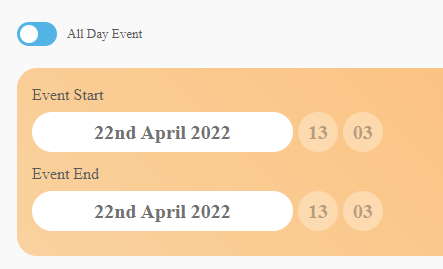
The UTC offset didnt help.
To explain a little more, I am wanting to show future events and hide past events, but include those from today
using [add_eventon event_past_future=”future” hide_past_by=”ee”]
Even though it is an all day event, once the time recorded next to the allday setting has passed, they do not show using the future shortcode above
So, an event with details as per the attached image will show until 13:03 and then it will disappear, even though it is an all day event. If I change the time to 23:59 then it will be visible until that time.
( 13:03 is just the time when i created the all day event)
No benchmarks are available, I am afraid.