We tried setting it to “allow until event ends” and it still displays the event as over the day of the event, even if the start time hasn’t happened yet. Our first thought was to check the time zone settings, but the only things we have found that can “override” this preemptive event closure is to either 1) turn off the RSVP function on the event or 2) set RSVPs to never close. This tells us something isn’t calculating correctly within the RSVP add-on.
Archives: Replies
Replies for tickets on suppota
Reply to: tickets(273381)
That worked great. Thank you!
Reply to: tickets(273380)
Hey! It looks like the filters are all enabled. On some of the options, there is a ? in a circle instead of a checkbox.
Reply to: tickets(273361)
Created a staging environment where only your plugin is running, nothing else, default theme: https://beta.angelustv.ro/program/
Password: hq8gwe!*ffu!3-nx-ukoQxB2tJRGQXAo
Admin: https://beta.angelustv.ro/dashboard
Username: eventon
Password: eventontesting
Reply to: tickets(273990)
Hello,
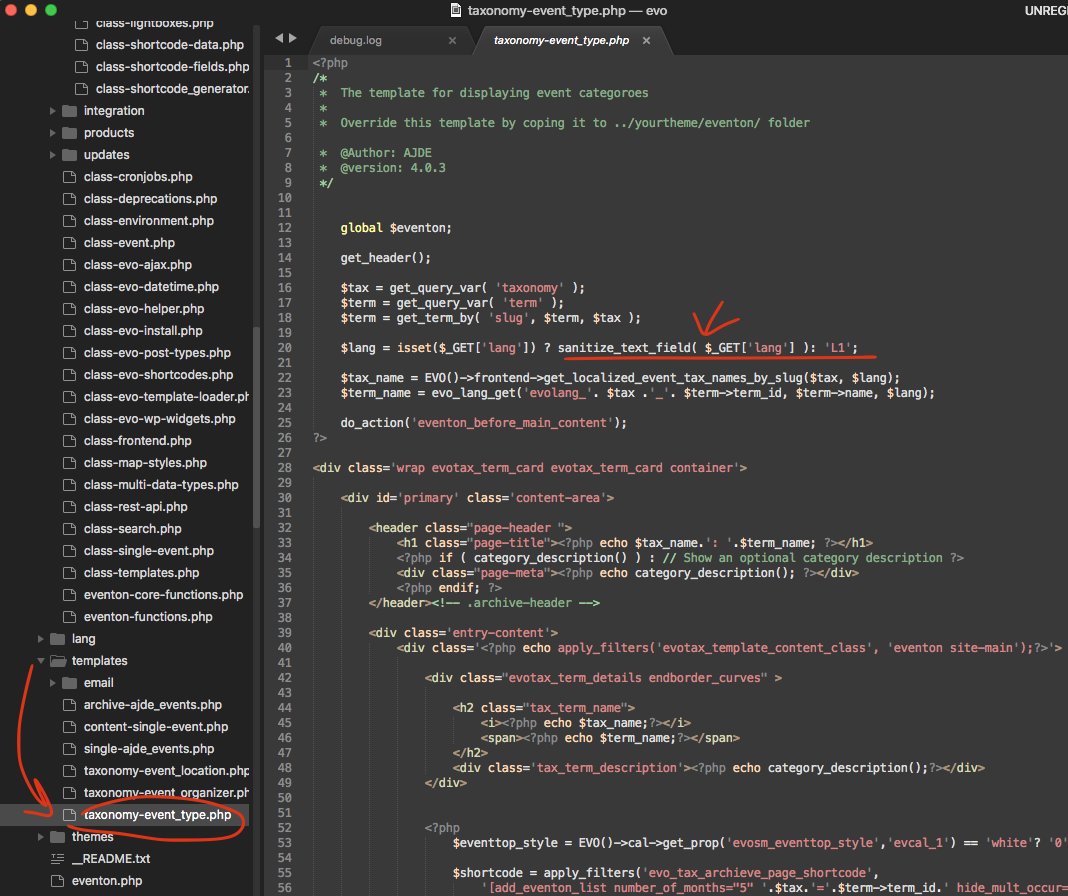
There was a code error on this file please use the patch fix to resolve it on your end:
Reply to: tickets(274012)
Hello,
1. Thank you for your great suggestion, at the moment it is not supported. However please create a new ticket and select Feature Request as category so others can vote on your idea and get it moved into development faster.
2. Please take a look at RSVP and Tickets add-ons:
https://www.myeventon.com/addons/event-tickets/
https://www.myeventon.com/addons/rsvp-events/
Try on https://dev.myeventon.com/wp-admin/
Reply to: tickets(274015)
Hello,
Please add this CSS code to EventON > Styles (If you don’t see any change, EventON > Scripts & Styling > turn off Write styles to header > save settings > turn on Write styles to header):
.ajde_evcal_calendar .calendar_header .evcal_arrows.evcal_btn_next:hover:before, .ajde_evcal_calendar .calendar_header .evcal_arrows.evcal_btn_prev:hover:before, .evo_footer_nav .evcal_arrows.evcal_btn_prev:hover:before, .evo_footer_nav .evcal_arrows.evcal_btn_next:hover:before { border-color: #939393df !important;}
Reply to: tickets(273361)
I deleted the caching plugin altogether (WP Rocket) and the day view navigation just doesn’t work properly, it goes from 31 to 30 to 30 to 30 to 29: https://angelustv.ro/program/
This plugin is so full of bugs 🙁
Reply to: tickets(273888)
in myeventon>>>>language
open tickets and scroll all the way to the bottom to Other strings
you will see event time and location
Reply to: tickets(273575)
yes that is right