see video below
generally as they are not being called upon they would not be slowing down your site but follow the directions in the vid above
Replies for tickets on suppota
see video below
generally as they are not being called upon they would not be slowing down your site but follow the directions in the vid above
We are glad your issue is resolved, if you have any further questions or concerns please create a new ticket.
If you have a moment, we would greatly appreciate if you could kindly leave us a review at codecanyon! from your account > downloads. Cheers!
We are glad your issue is resolved, if you have any further questions or concerns please create a new ticket.
“the icons are there- if you roll your mouse pointer over the area- it changes to a hand and then click the mouse and the icons picker appears
I have added 2 icons – you can change them to what you are after”
Thank you! All good, only: At Additional Field #5 “EINLASS” still no button is offered to me …
Thank you so much for the video – super helpful. I have managed to set the capacity and switch off the issuing of temporary passwords in the back end.
For clarification, what I mean regarding the ticket types is this – so my swimming event has a capacity of 40 people in the pool. Some parents will not go in the pool and they will spectate. So a parent might RSVP on behalf of their family and say 2 people attending, but only 1 of these is swimming. I need to know how many in the pool and how many spectating, so that’s why I wondered if I could set up ticket types – or some way of people RSVPing and telling me whether they are swimming or spectating? This wouldn’t only apply to swimming, but for future events where there is a different between actively participating and spectating.
Thanks.
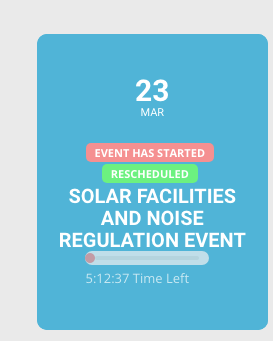
This is happening again to an event scheduled for today at 12:00 noon EDT, screen shot is attached.
Thanks for your attention, for now we think we have solved it ourselves somehow. If there is a problem, we will ask you again with applied buttons as you said.
Ok, thank you!
Hello, No I do not agree with your proposal, I have spent too much time now waiting. You said to me in August 2021: You said to me: “Thank you Jean Marc. I have identified the problem and we will release a new version for actionUser and actionUser and very soon once we have done some more testing. ? Ticket #248145 and there I never received the answer on this subject, hence my reminders. And so to finally know if you have made these updates! Today I no longer have the time, nor the means to call everything into question! Just let mi know, what going on ? Jean Marc
not normally – the event top is just that the top of the event to click to get to the actual event details
but if you create an event with 2 buttons- I will have a look to see if theres a css solution