yeah some kind of weird text in the description of the event organiser
see video below
this was the weird code I removed not sure if it has relevance
<div id=”ir-ext-ui” style=”color: #000000; font-size: 16px; line-height: 16px; background-color: #f7f7f7; border: 1px solid #999999; border-radius: 1px; top: 1px; left: 1px;”>
<div class=”ir-ext-dimensions”><span class=”ir-ext-rendered” title=”Rendered image dimensions (after any scaling/resizing has been applied)”> x </span> <span class=”ir-ext-natural” title=”Natural image dimensions (without applying any scaling/resizing)”> (x) </span></div>
<div class=”ir-ext-filesize”></div>
</div>
<div id=”ir-ext-ui” style=”color: #000000; font-size: 16px; line-height: 16px; background-color: #f7f7f7; border: 1px solid #999999; border-radius: 1px; top: 1px; left: 1px;”>
<div class=”ir-ext-dimensions”><span class=”ir-ext-rendered” title=”Rendered image dimensions (after any scaling/resizing has been applied)”> x </span> <span class=”ir-ext-natural” title=”Natural image dimensions (without applying any scaling/resizing)”> (x) </span></div>
<div class=”ir-ext-filesize”></div>
</div>
<div id=”ir-ext-ui” style=”color: #000000; font-size: 16px; line-height: 16px; background-color: #f7f7f7; border: 1px solid #999999; border-radius: 1px; top: 1px; left: 1px;”>
<div class=”ir-ext-dimensions”><span class=”ir-ext-rendered” title=”Rendered image dimensions (after any scaling/resizing has been applied)”> x </span> <span class=”ir-ext-natural” title=”Natural image dimensions (without applying any scaling/resizing)”> (x) </span></div>
<div class=”ir-ext-filesize”></div>
</div>
it might have come along if you imported organisers from somewhere else- I don’t know
Create a new user with admin rights. Send it’s login info to us here. Then, when we done fixing, delete the user.
so after playing around with that idea to make it more like your site colors
try replacing the css with this
.evo_ajax_load_events span::before {
content: “”;
}
.evo_ajax_load_events span::after {
content: “Loading CALENDAR”;
color: #a2c614;
font-weight: bold;
font-size: 45px;
}
Try adding this to
appearance>>>>>customize>>>>>additional CSS
.evo_ajax_load_events span::before {
content: “-“;
background-color: yellow;
color: red;
font-weight: bold;
font-size: 45px;
}
.evo_ajax_load_events span::after {
content: “Loading CALENDAR”;
background-color: yellow;
color: red;
font-weight: bold;
font-size: 45px;
}
also I saw on your website
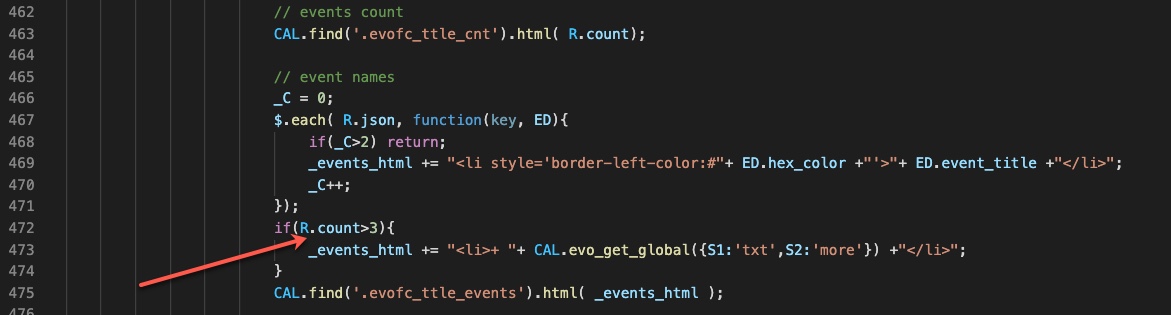
Hi Ashan,
thanks for your fix, however it doesn’t work and with this change no “+” is showed at all. I assume this is due to the fact that in your variable “_C” you store the already processed events and I think you need check the total amount the the events (R.count), right? I do the fix in the attached screenshot checking the R.count. Feel free to correct me if I’m wrong.
Would you include this tiny fix in your next release?
Thank you,
Milko
These might be able to help:
https://wordpress.org/plugins/smtp-mailing-queue/
also look for SMTP Plugins that have throttling built in (throttling is the technical term used to describe what you are after)
normally you would connect it to a cron job – I’d recommend normal cron over wp-cron which requires your website to load in order to trigger the cron job (where as normal cron jobs will run even if no one is on your site)
Hello,
Yes i see the progress bars, but for my direction it’s not explicit enough for our clients (majority of old people). Your progress bars are a bit too modern for our clients..
Let me assign this to Ashan – might need some kind of email throttling which breaks up lists into chunks in your case of 100 and then cron jobs to send 100 every xyz minutes
while you wait for Ashan I’ll see if there is a plugin that can help –
How can I send you a login info and not be a part of the history of this ticket?