Hi
Sorry, I forgot about the member login, here it is:
User: awcmember
Pass: Wallaby2022
Thanks
Replies for tickets on suppota
Hi
Sorry, I forgot about the member login, here it is:
User: awcmember
Pass: Wallaby2022
Thanks
Yes, of course. Just let me know when we can test this.
Could you make sure that quotes are correct: https://pastebin.com/M95jUJYm
ux_val is the one that controls the interaction.
We are glad your issue is resolved, if you have any further questions or concerns please create a new ticket.
Hello,
Can we check the .csv file you are trying to upload?
User Interaction Fields:
_evcal_exlink_option => UX_val from 1-4 (integer)
evcal_exlink => UX_VAL link to event URL (http://)
_evcal_exlink_target => UX_val link open in new window yes | no
To add more fields please follow
https://docs.myeventon.com/documentations/import-additional-fields-using-hooks/
For example, for RSVP please add the code and replace _field_var_name with evors_rsvp.
You can find any variable to import by opening the HTML code and looking for hidden inputs:
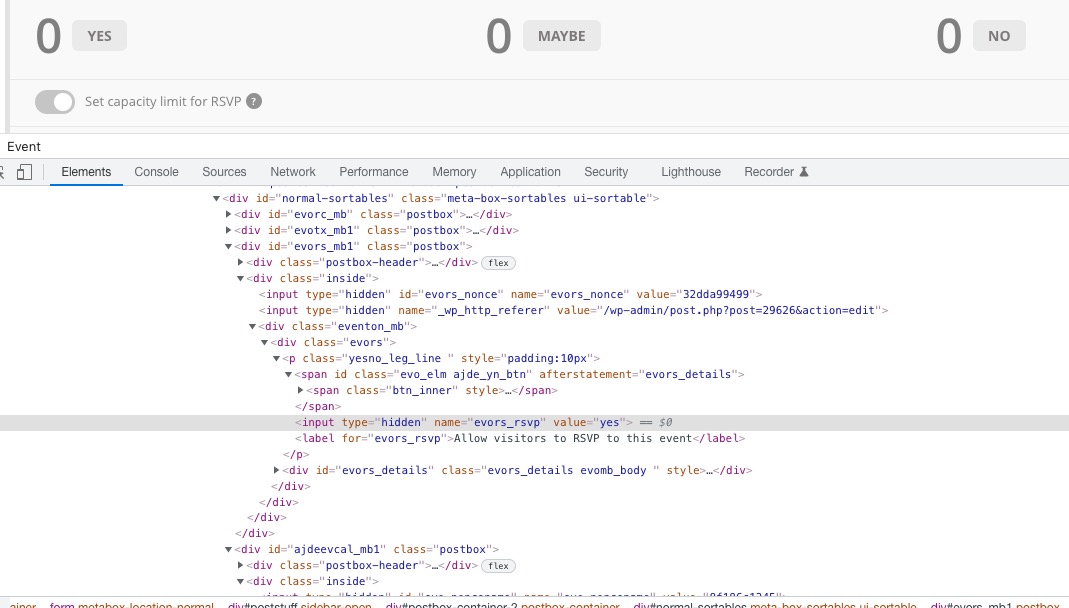
Hello,
Please add this CSS code to EventON > Styles (If you don’t see any change, EventON > Scripts & Styling > turn off Write styles to header > save settings > turn on Write styles to header):
.ajde_evcal_calendar.color #evcal_list .eventon_list_event a:hover { border-left-width: 0 !important; }
The code will stop the text from moving.
Which event are you referring to? Could you send us a link?
Could you also create an event with similar to “Feb 19th” characteristics and let us know if there is an issue?
Kevin just wanted to let you know. we will be trying to push the update in the next few days 🙂
I am sorry what was the question? the client purchase has already been refunded.
Hi Artem,
Thank you for your reply.
I do realise that the progress bar is only available when an event is live.
I realise I didn’t actually make myself clear.
What I had meant o say is that sometimes the progress bar is failing to appear on the events, and I’m not sure why this is happening.
For example my last event I held on 19th February normally has the progress bar, but this time it didn’t appear, and I needed to know if there is a fix for this?
Kind regards
Susann