When you go to Media, are all EventON images in webp format?
Archives: Replies
Replies for tickets on suppota
Reply to: tickets(266712)
Hello,
You can use Bookings add-on:
https://www.myeventon.com/addons/bookings/
It allows you to autogenerate blocks:
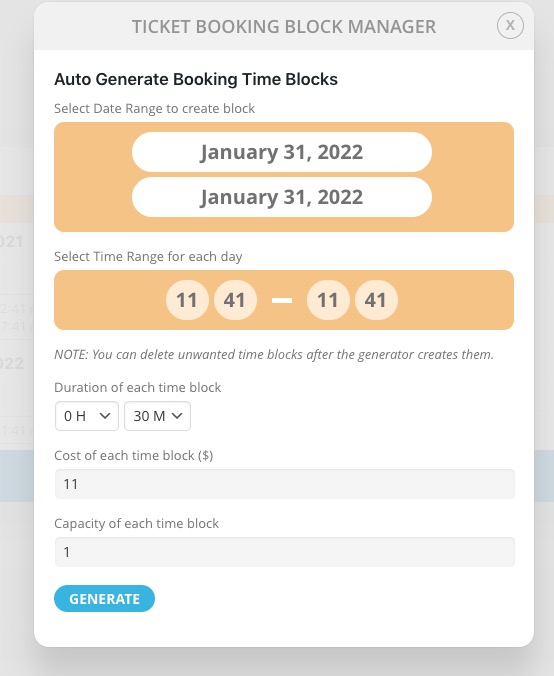
Try on https://dev.myeventon.com/wp-admin/
Reply to: tickets(265144)
Well… apparently you’re not really interested in tracking your customers…
There is a problem again, I create a new ticket… hoping to have an answer this year…
Reply to: tickets(266719)
Hello,
You can remove them depending on the age. However, disk space is cheap enough to not to touch them, since they don’t weight that much. Average PDF is only 24KB.
Also they don’t affect performance in any way, since the server only stores them.
Reply to: tickets(266720)
Hello Ben,
Please take a look at this article https://docs.myeventon.com/documentations/how-to-create-events-that-goes-past-midnight/
Reply to: tickets(266721)
Hello,
I am using Chrome and the calendar is displaying.
Please clear your cache and check again.
Reply to: tickets(266673)
In that case, you can use some custom CSS code to change the background of the sorting option:
Please add this CSS code to EventON > Styles (If you don’t see any change, EventON > Scripts & Styling > turn off Write styles to header > save settings > turn on Write styles to header):
.eventon_filter_line .filtering_set_val{backgroud-color:grey; color:#fff;}
Reply to: tickets(262713)
Thank you!!
Reply to: tickets(266715)
Hi Stephan,
In order to make sure we are on the same page, please send a screenshot of what you are referring to so that we can take a look.
Reply to: tickets(266718)
Hi Jonny,
Could you please try the instructions mentioned in this documentation to make sure your issue is indeed coming from eventon.