The avatar photo is an iframe to our google reviews, so not stored in our server.
The header I am in the middle of working on so that could be an issue.
You can see the clickable images below and all over are webp though.
Replies for tickets on suppota
The avatar photo is an iframe to our google reviews, so not stored in our server.
The header I am in the middle of working on so that could be an issue.
You can see the clickable images below and all over are webp though.
Hi Artem, this is 3.1.7. you can see 4.0.2 this test address:
https://nhkmizmir.org/etkinlikler/test-etkinligi/
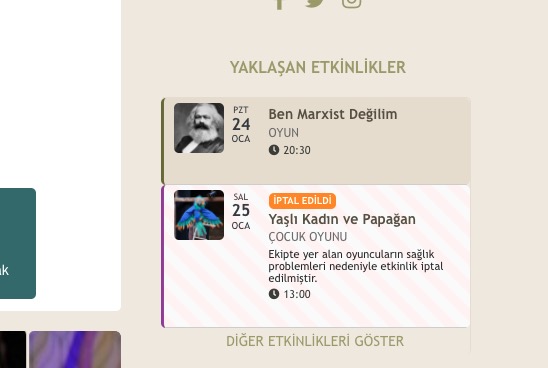
right side widget
Hello,
Would you mind sending the account which is not loading and the order number of the plugins in question?
As for the subscriptions you notices, please send a screenshot so that we can take a look.
I raised it to 1500MB and still got same error asking for same amount of extra memory.
[24-Jan-2022 14:39:33 UTC] PHP Fatal error: Allowed memory size of 1572864000 bytes exhausted (tried to allocate 20480 bytes) in /home/bmwra/dev2.bmwra.org/wp-includes/meta.php on line 1085
[24-Jan-2022 14:39:33 UTC] PHP Fatal error: Allowed memory size of 1572864000 bytes exhausted (tried to allocate 20480 bytes) in /home/bmwra/dev2.bmwra.org/wp-includes/class-wp-fatal-error-handler.php on line 72
When I tried to raise it to 2000MB and tested again, it would either come up with blank page, or give me a 404 error.
Considering how before this issue I would have it set to only 150MB and it worked fine for years, and now no matter how high I set it the message is always “tried to allocate 20480 bytes”, I think we can rule out it not having enough memory. I have never run across a script that would need that much memory ever.
Please advise and thank you for your time.
Could you send us wp-admin access so we can create an example event?
Ashan will check issues with the new version of Tickets ASAP.
As for https://helpdeskx.s3.amazonaws.com/wp-content/uploads/2022/01/15063640/Ekran-Resmi-2022-01-15-00.07.05.png. Where can we see this?
Hello,
Ashan will check your other ticket ASAP.
Please follow the instructions in this documentation to activate debug in your site to see any PHP errors recorded that can provide insight on to whats going on. Please reply with a link to debug.log file. If you are not able to do this please send us FTP access to your site so we can do this for you.
Ashan.
On dev2: https://dev2.myeventon.com/wp-admin/post.php?post=29247&action=edit
Thank you for your messages, I am going to assign this ticket to Ashan and he will be able to take it from here and find you a solution. Please allow some time for him to get back to you, we greatly appreciate your patience and thank you for being a eventon customer! Also please disable any IP blocking on your site if there are any.