How can I safely and privately give you wp-admin access?
Replies for tickets on suppota
How can I safely and privately give you wp-admin access?
Hi Artem, just to make certain I am clear, would you please clarify what to do in my particular situation? For whatever reason I cannot do the autoupdate, so my best bet appears to be the backend way you describe in section 2.2 of https://docs.myeventon.com/documentations/update-eventon/. On that page you state the following:
“First go into eventon settings and save Do not delete eventon settings when I delete EventON plugin and then Save Changes.
WARNING! – When updating from EventON version 2.6.6 & 2.6.7 you must leave the above settings to NO (due to code error)! – If you are on EventON v2.6.8 or up this setting must be set to YES in order to keep already created events.”
Does the WARNING section only apply when upgrading from 2.6.6 to 2.6.7, or does it apply to any version prior to 2.6.6? I am upgrading from 2.5.1 to 4.0.2, so it seems for the “Do not delete eventon settings when I delete EventON plugin” setting I should set this to “Yes” before upgrading. Is this correct?
Hello,
Take a look at “Other Uses (Advanced)”:
https://docs.myeventon.com/documentations/shortcode-generator/
Now you can add the variation by using PHP.
Hello,
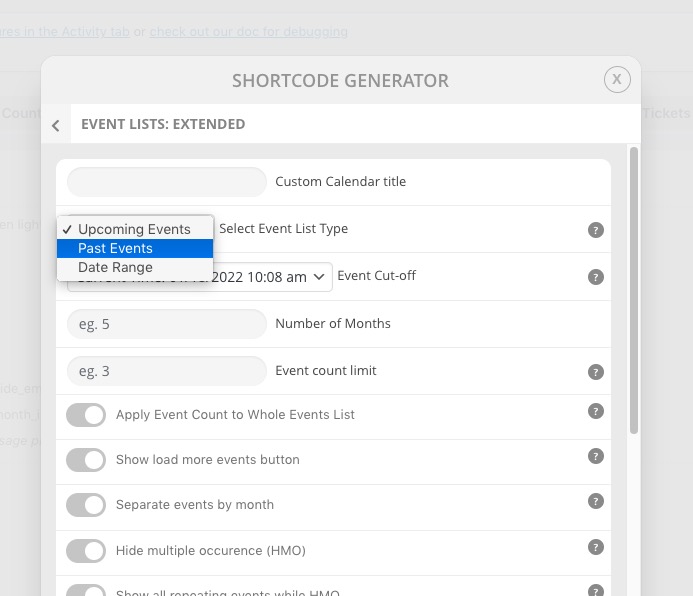
You can use Event Lists shortcode and show past events:
https://docs.myeventon.com/documentations/how-to-show-past-events/
OR Event Lists: Ext shortcode and show past or date range of events:
OR YearlyView add-on:
https://www.myeventon.com/addons/yearly-view/
Try on https://dev.myeventon.com/wp-admin/
Please send us wp-admin access to your site as a private message for us to further assist your situation.
Hello,
It seems that the issue happens because of old versions of EventON and Tickets add-on. Could you update both?
To update eventon to latest version: If you are unable to do autoupdate, you can go to codecanyon your account > download and get the latest eventon version as zip file. Then you can go to your website, deactivate old eventon, activate (Do not delete eventon settings & data when EventON is uninstalled) from eventon settings, delete old eventon, install new one and activate. This link will further explain the process it. Also you can follow us on twitter to get real-time announcements on updates!
To update eventon addons: You can download latest eventon addons from myeventon > my account. Then you can go to your website, deactivate old addon and install new one and activate then delete the old addon. This link will further explain the process. Also you can follow us on twitter to get real-time announcements on updates!
PS If you still want to use the old calendar design please go to EventON Settings > Event Top > Select Default Calendar EventTop Style: Clear with left border colors and gaps.
Hello,
Users can click on arrows to scroll through the gallery:

You can also disable “Show as a separate gallery” so users can scroll with from the event card.
The rest isn’t available at the moment. However please create a new ticket and select Feature Request as category so others can vote on your idea and get it moved into development faster.
Just tested with EventOn, Tickets and Reminders. Reminders crashed the site. Disabling that allowed the Events to show, but I did not test beyond that after seeing this response…
Hi,
It’s me again! Any updates on my issue above? A possible solution date would be very helpfull as it’s already been more than 6 weeks since I have issued the ticket.
Thanks so much!
Regards
Sorry, I just wanted to add that tickets are set as repeating events each month. So one event will be created with repeating event dates through the month.