Hello,
You can use the custom CSS code below:
/*change event color for classes page*/
.page-id-15425 .eventon_events_list .eventon_list_event .desc_trig {
cursor: pointer;
background-color: #080A5E !important;
}
/*change event color for performance page*/
.page-id-8003 .eventon_events_list .eventon_list_event .desc_trig {
cursor: pointer;
background-color: #074E30 !important;
}
Please add this CSS code to EventON > Styles (If you don’t see any change, EventON > Scripts & Styling > turn off Write styles to header > save settings > turn on Write styles to header):
Whoops! I updated the classes page so it’s public.
It’s the teal color that is the event color, I can’t highlight it.
I’m uncomfortable doing that. I’m unclear why you can’t look at the page and see what’s wrong. Or ask me to send screenshots.
Hello,
You can use your own email and then send the credentials here via private message.
Hello,
Which color would you like to change exactly? Please send in a screenshot highlighting the color to change on that particular page. Also this page https://danceatl.org/classes-festivals-intensives/ leads to a 404 error page.
Hi Peter,
Please use the custom CSS code below to change the date color
.eventon_events_list .eventon_list_event .evcal_cblock em, .evo_pop_body .evcal_cblock em{color:#fff;}
.evcal_cblock .evo_end:before{background-color:#fff;}
Please add this CSS code to EventON > Styles (If you don’t see any change, EventON > Scripts & Styling > turn off Write styles to header > save settings > turn on Write styles to header):
What email address should I use to provide you with access?
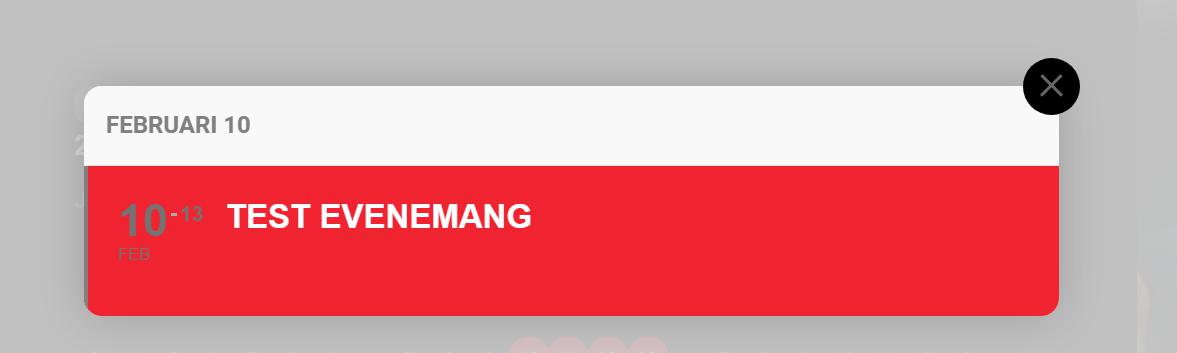
Hello
I figured it out where to change title colour, but can´t find where to change the date colour in the popup in Year view. Now this is grey
Best regards
Peter
I have followed your instructions:
- Deactivated all plugins except EventON and WooCommerce, which is required by Action User.
- Switched to Twenty Twenty-One theme.
- Turned on debugging.
- Went to edit a published event. Clicked on Manage Assigned Users.
Results:
- System still hangs. Unable to get beyond the popup (same as screenshot).
- No error reported in debug log. Only a deprecation warning from Elementor, but not as a result of trying to edit event or assign user. [30-Dec-2021 15:19:40 UTC] PHP Deprecated: _register_skins is <strong>deprecated</strong> since version 3.1.0! Use ElementorWidget_Base::register_skins() instead.
- Browser console indicates errors on the event edit page, including this: Mixed Content: The page at ‘https://events.iloveseattle.org/wp-admin/post.php?post=2499&action=edit’ was loaded over HTTPS, but requested an insecure stylesheet ‘http://events.mysite.org/wp-content/plugins/eventon-action-user/assets/au_styles_settings.css?ver=5.8.2’. This request has been blocked; the content must be served over HTTPS.
Hello, This ticket of mine still has no one to support. Can you help me translate the word “All Day”