ok, thanks again.
Have a nice day!
Replies for tickets on suppota
ok, thanks again.
Have a nice day!
Dave! You are awesome!! And hilarious too.. Thank you for taking time to make this video!
I have been using EventON for about a year now and I think 6 of my clients are using the ticket addon.. You are right – there are many things that are not too obvious in the settings etc. But her, I usually always find a way.
I have “solved” this problem before by adding a custom field – a text box – then added a div for each date, then styled it up with some flex-box stuff so they show nice and responsive etc. That way I can add as many repeating dates as I want and I’m not confined to using x-amount of custom fields (if there are more than 3 dates – I know I can add more custom fields with a php-snippet). But it will work just fine with a single custom text field I think.
you have an additional pop up login before getting to the page- can you deactivate that or provide the username and password please
yes see video below
to be honest remove the repeating event and simply make the event run for 3 days using the date picker
when they add it to cart- it will show 24th Oct – 27th Oct
see video below for additional options
the other benefit is you can set when you stop selling tickets- do you want people to buy tickets on day 2? or do you want all tickets bought before the event starts
thats found in myeventon>>>>>tickets>>>>Default event ticket stop selling time base
crt – thats a mistake.. On the checkout and basket screen I meant 🙂
That didn’t work.
I applied it on the homepage here:
https://staging-mooneevalleycitycouncil.temp927.kinsta.cloud/
Shortcode:
[add_eventon id=”globalcalendar” ft_event_priority=”yes” show_limit=”no” ux_val=”3″ accord=”yes” subscriber=”no” wishlist=’yes’ tiles=”yes” tile_style=”1″ tile_count=”3″ event_count=”3″ tile_bg=”1″ etc_override=”yes” hide_so=”yes” eventtop_style=”0″]
Thank you, it works!
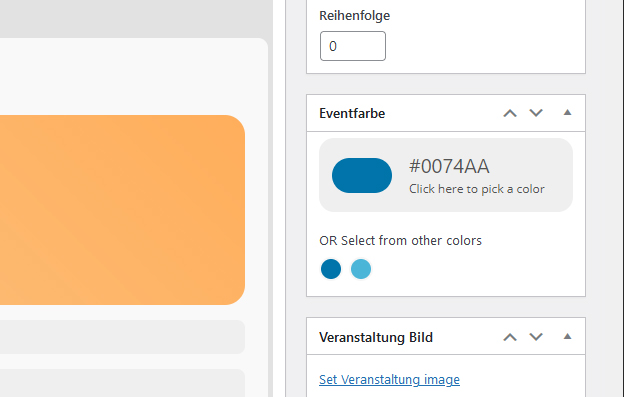
Now only the event’s border is now in the event’s color. That’s fine!
Is it possible to change the predefined colors (see screen shot)?
Hello,
Please add eventtop_style=”0″ to your shortcode to make the events to display like before.