Hello,
okay!
user: support@myeventon.com
password: v$IlzuyBZ#%maskOiJvI*GQC
Replies for tickets on suppota
Hello,
okay!
user: support@myeventon.com
password: v$IlzuyBZ#%maskOiJvI*GQC
see video below
I don’t think that your solution works, because of
[16-Sep-2021 10:19:38 UTC] PHP Notice: Constant WP_MEMORY_LIMIT already defined in /home/twiligh2/jsc.sa/wp-cron.php on line 151
Could you check and make sure that WP_MEMORY_LIMIT is defined only once?
I think you need to contact your hosting provider so they can increase the limit in php.ini.
when editing the event you can exclude the event from the calendar (located in the right side of the edit event page) so it wont appear
but it will appear via the single event shortcode.
if thats not an option for you
try adding (or editing)
ux_val=”3a”
to the calendar shortcode or replace it if you already have it)
that enabled the pop up to be based on ajax and as a result might not load until that event is clicked
(its an untested theory)
Ashan,
Multiple customers reported similar issue with https://www.chef-julia.com/dev/wp-content/themes/foodhub/js/jquery.countdown.js?ver=1.0.0
When a theme uses jquery.countdown.js it always breaks countdown. Can we fix this from our side?
Thank you for your messages, I am going to assign this ticket to Ashan and he will be able to take it from here and find you a solution. Please allow some time for him to get back to you, we greatly appreciate your patience and thank you for being a eventon customer! Also please disable any IP blocking on your site if there are any.
The problem is in Tickets add-on:
[16-Sep-2021 09:59:30 UTC] PHP Fatal error: Uncaught ArgumentCountError: Too few arguments to function EVOTX_Virtual_Events::card_vir_show(), 2 passed in /var/www/0/293418/www/wp-includes/class-wp-hook.php on line 303 and exactly 4 expected in /var/www/0/293418/www/wp-content/plugins/eventon-tickets/includes/class-integration-virtualevents.php:31
Stack trace:
#0 /var/www/0/293418/www/wp-includes/class-wp-hook.php(303): EVOTX_Virtual_Events->card_vir_show(true, Object(EVO_Event_Virtual))
#1 /var/www/0/293418/www/wp-includes/plugin.php(189): WP_Hook->apply_filters(true, Array)
#2 /var/www/0/293418/www/wp-content/plugins/eventON/includes/calendar/views/eventcard_virtual.php(175): apply_filters(‘evo_eventcard_v…’, true, Object(EVO_Event_Virtual))
#3 /var/www/0/293418/www/wp-content/plugins/eventON/includes/calendar/views/eventcard_virtual.php(200): EVO_Event_Virtual->can_show_main_content()
#4 /var/www/0/293418/www/wp-content/plugins/eventON/includes/calendar/views/eventcard_virtual.php(57): EVO_Event_Virtual->get_main_content()
#5 /var/www/0/293418/www/ in /var/www/0/293418/www/wp-content/plugins/eventon-tickets/includes/class-integration-virtualevents.php on line 31
Could you update it?
To update eventon addons: You can download latest eventon addons from myeventon > my account. Then you can go to your website, deactivate old addon and install new one and activate then delete the old addon. This link will further explain the process. Also you can follow us on twitter to get real-time announcements on updates!
Please also update other add-ons.
Thank you for your great suggestion, at the moment it is not supported. However please create a new ticket and select Feature Request as category so others can vote on your idea and get it moved into development faster.
Ok, got it.
I got the eventon single and the eventon list on one page.
Thats why its double an the anchor does not work…
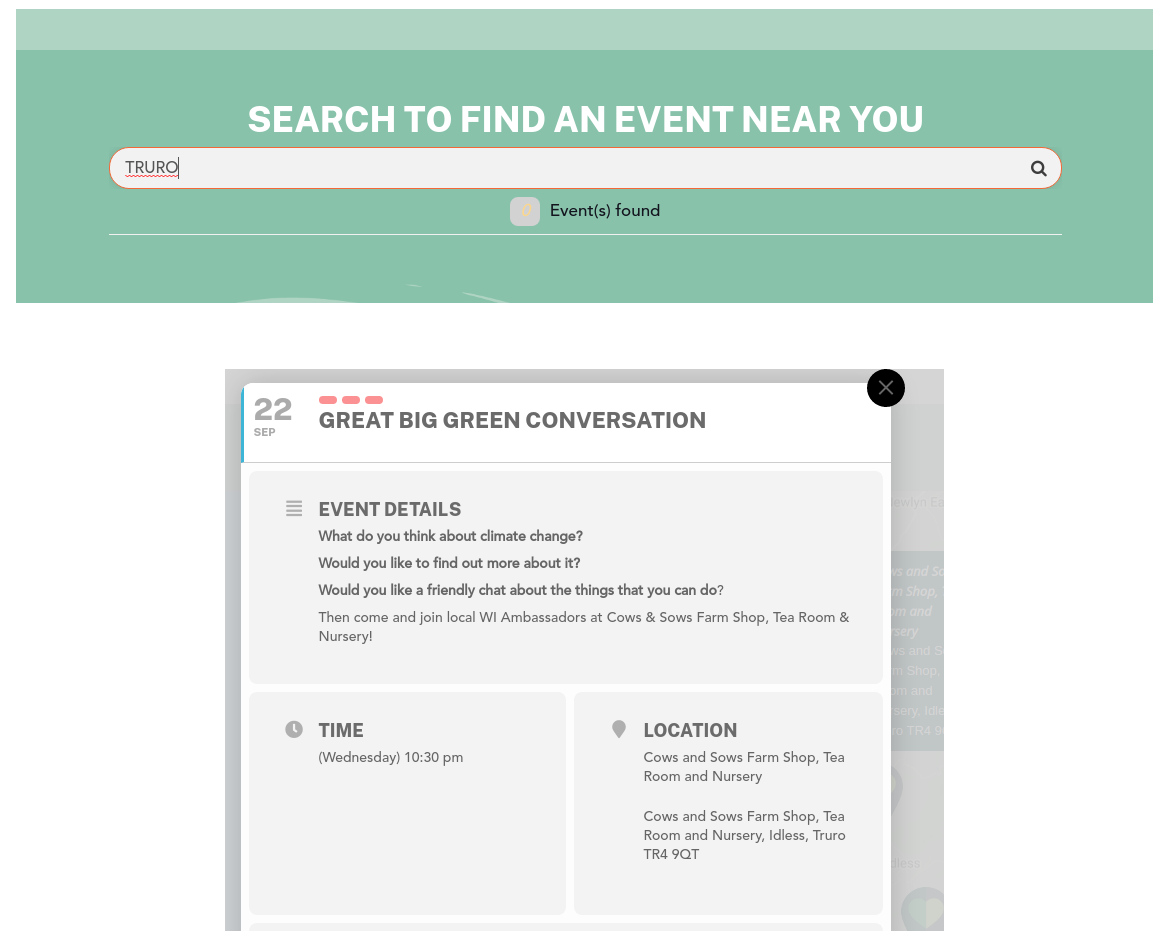
I think your search for Aberystwyth works because Aberystwyth is included in the Event details section, and not just the location.
Here’s an example where it doesn’t work: Truro – which doesn’t appear in the event title or details, but is in the location, and so doesn’t show up in the search results.