I tried selecting a different event content filter type and it worked!!! Thank you very much!!
Archives: Replies
Replies for tickets on suppota
Reply to: tickets(395682)
Please try using ux_val=”3a” in the shortcode and see if the cache issues re-appears.
Reply to: tickets(395591)
We are glad your issue is resolved, if you have any further questions or concerns please create a new ticket.
If you have a moment, we would greatly appreciate if you could kindly leave us a review at EventON WordPress Page OR Codecanyon. Your review helps us a lot in continuing EventON improvements!
Reply to: tickets(395733)
Hello,
Please go to EventON > EventTop > set Select Default Calendar EventTop Style to Colorful with gap between events.
Now each event will start using Event Color from Edit Event page.
Please try my suggestion and let me know.
Reply to: tickets(395698)
Ashan,
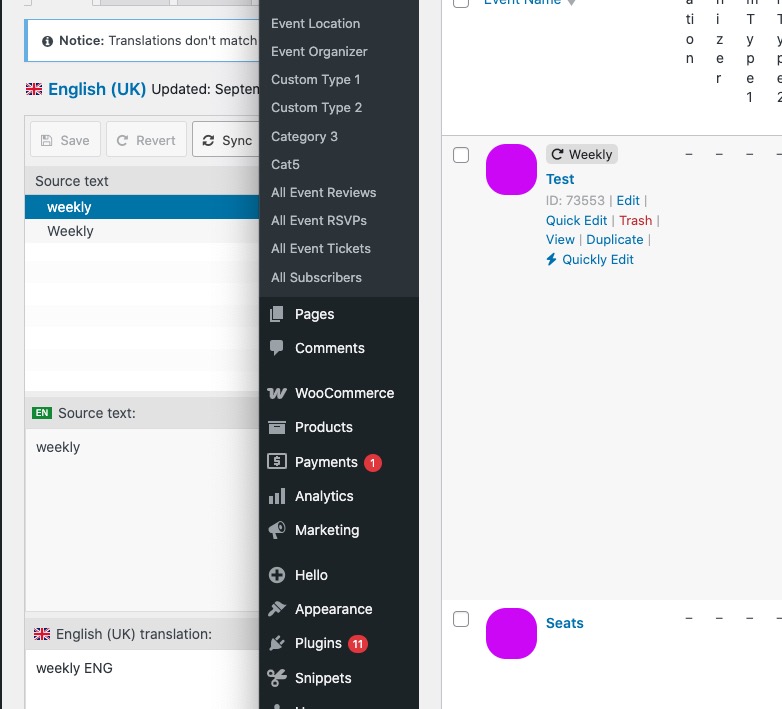
I translated Weekly on dev2 for English, but it doesn’t apply the translation:
https://dev2.myeventon.com/wp-admin/edit.php?post_type=ajde_events
https://dev2.myeventon.com/wp-admin/admin.php?path=languages%2Floco%2Fplugins%2Feventon-en_GB.po&bundle=eventON%2Feventon.php&domain=eventon&page=loco-plugin&action=file-edit
Reply to: tickets(395698)
Thank you for your messages, I am going to assign this ticket to Ashan and he will be able to take it from here and find you a solution. Please allow some time for him to get back to you, we greatly appreciate your patience and thank you for being a eventon customer! Also please disable any IP blocking on your site if there are any.
Reply to: tickets(395553)
Could you send us a couple screenshots with errors?
Are you using this Tool to check for errors:
https://search.google.com/structured-data/testing-tool/u/0/
Reply to: tickets(395525)
Alright, I have now removed the other calendar system, and I am still getting a blank page when trying to get the Full Cal to load. That said, the group I am working for on this project would like the calendar to have a very similar look and feel to this calendar here:
https://laretreatcenters.com/event-directory/
Of course, I need to start with it actually showing up, but what choices do I need to make to get this calendar version through shortcode?
Thank you,
Jason
Reply to: tickets(395591)
ok i see now… thank you so much for the quick help!
Reply to: tickets(395579)
Great news Artem, thanks again. I’ll go ahead and mark this as resolved. Have a great day!