Reply to: tickets(252082)
Replies for tickets on suppota
Hi Helen,
Be sure to let us know how it goes.
Best,
Hello,
From that error it seems that you need to add more WP memory. Here https://docs.myeventon.com/documentations/increasing-wordpress-memory-limit/ is a tutorial on how to add the memory.
Thank you. We really need to solve this as we need to cancel an event. But we cannot cancel it since we cannot save the event.
Hi,
Thanks for getting back to me. I was hoping for a solution for all my future events that I have already set up – I’ve got over 400 loaded and wanted to know if there is a way to change them all rather than go through each one.
Thanks
Helen
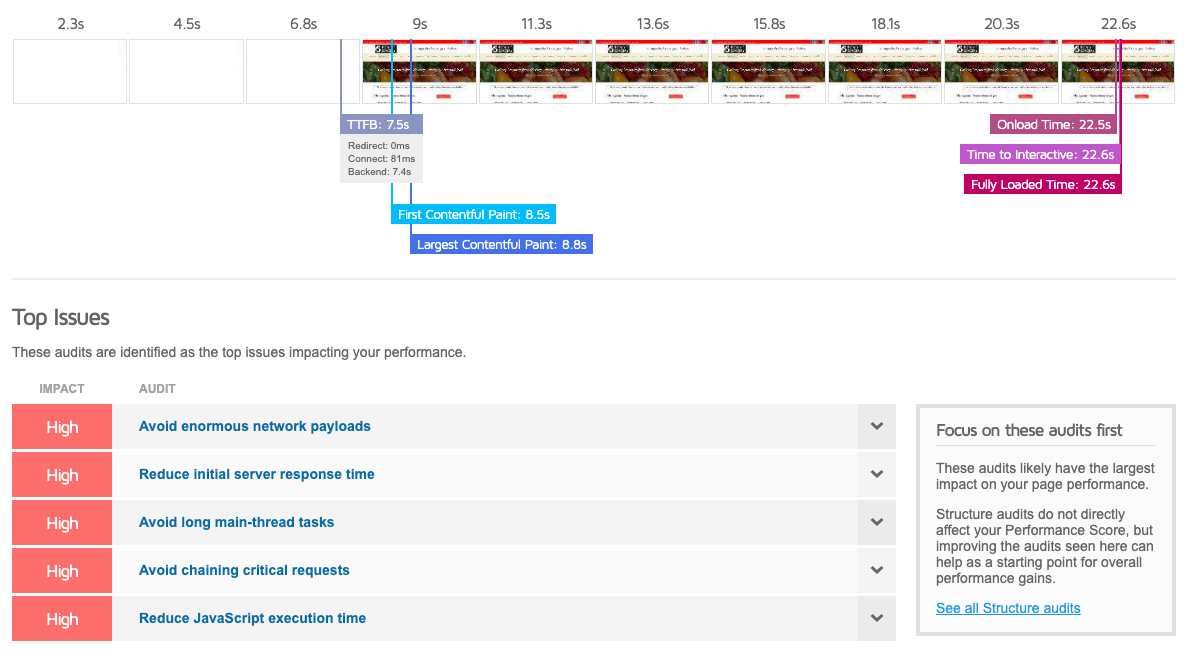
Thanks for your help gtmetrix is giving us a really low score hence the email – I’ll try what you suggested.
Thanks
Helen
Dear Support Team,
I did everything you said but
Unfortunately, Still, I have an issue with this page event
https://jsc.sa/wp-admin/post.php?post=1889&action=edit
How can I fix this and I upgrade the plan to VPS Server to can be open this event page to get the data on it?
I got this message
Fatal error: Allowed memory size of 536870912 bytes exhausted (tried to allocate 2273280 bytes) in /home/twiligh2/jsc.sa/wp-includes/functions.php on line 5107
please can you help me and how can I got the data
For information every attendance on this page but is difficult to download one by one
https://jsc.sa/wp-admin/edit.php?post_type=evo-tix
https://prnt.sc/1soldgv
I have about 39400
hello please see video below
are you changing the default timezone on the event itself as my test shows it defaults to london +1
Sort of
Step 1: grab a beer, coffee or coke
Step 2: put on your favourite music
Step 3: go to events
step 4: right click the edit event and open in a new window
step 5- open as many events on that page that have RSVP
step 6- remove the email address and save
step 7: as the event is saving- move onto the next event and repeat
step 8: by the time you get to the end of that list – all the pages should have saved so you can close them down
step 9: go to the second page and then go back to step 4
Step 10: by the time you get to page 6 of the events it might be time to drink something harder like a scotch or vodka
or if your website has cpanel you could simply set up email conditions so that if training@hawkridgesys.com recieves an email where the subject line contains “New training registration notification”
delete it
so it will be sent but it gets auto deleted and no one is the wiser. that all depends on your host
i wouldn’t recommend stuffing around with the database and that would be outside the scope of this helpdesk