oh sorry, correction, we would call it “Spot”, not date.
Squad 1: Spot 1, 2, 3, 4, 5
Squad 2: Spot 1, 2, 3, 4, 5
Squad 3: Spot 1, 2, 3, 4, 5
Squad 4: Spot 1, 2, 3, 4, 5
etc…
Replies for tickets on suppota
oh sorry, correction, we would call it “Spot”, not date.
Squad 1: Spot 1, 2, 3, 4, 5
Squad 2: Spot 1, 2, 3, 4, 5
Squad 3: Spot 1, 2, 3, 4, 5
Squad 4: Spot 1, 2, 3, 4, 5
etc…
Hi Ashan, thanks for answering as well! Yes, if we can have both options as a toggle that would be good. A seat map with a drop down of Row #, then Seat # should work. Although in our case we would call it “Squad” , then “Date”
Squad 1: December 1, 2, 3, 4, 5
Squad 2: December 1, 2, 3, 4, 5
Squad 3: December 1, 2, 3, 4, 5
.. etc.
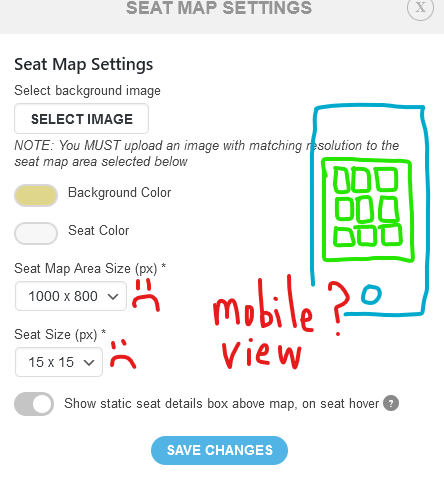
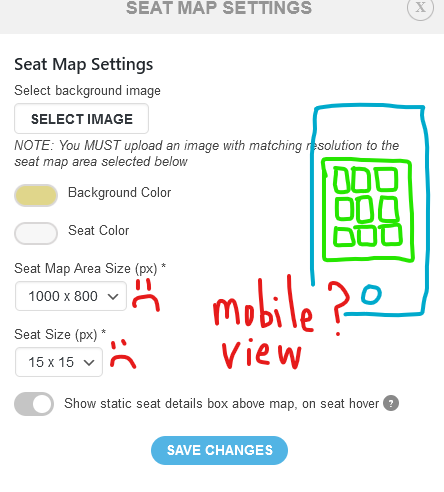
As for Basilis, I think the above is quite reasonable as EventOn’s base plugin is beautiful for mobile. Having the Seats plugin look good for mobile just seems to make sense to lock this one down for our clients. There is currently too much hard-coding in the seats setting which has lead to this. Ie, the seat size and map size are all hard-coded!
See the hard coding in picture:
Yes previously a separate ticket ID was issued which made life much easier for us. However now all that gets downloaded is a number 1 allocated to the ticket purchaser and there is no mention on the CSV of the other tickets issued in the bundle, or the actual $ value of the purchase. We are having to add this manually on the CSV file. I have noted this change in process in the images above. We can see the right number of tickets purchased and $ value if we click on attendees on the website. It just doesn’t get downloaded in the CSV file.
lets please try to keep things in the same place. version 2.2.7 should be available now. Let us know if you do not see it in the my account section.
Ok order refunded please go ahead and re purchase the addons. using same coupon code
Ok, there seems to be some glitch in the system I will go ahead and refund you for this order. And you can use the same coupon code and re-purchase those addons.
interesting google search central defines this just the way we have included in the events https://developers.google.com/search/docs/advanced/structured-data/event
We will do more research into this.
is this the event you are referring to which is a repeating event with 120 repeat instances. https://theparishtrust.org.uk/wp-admin/post.php?post=12096&action=edit
want to clarify, so when that setting is turned on are you getting the error on single event page or any page with the calendar added via elementor? setting that will try to run ajax calls to make sure virtual event information is updated as it happens.
I think there is a little misunderstanding. If 1 person buy 4 tickets they all will have separate ticket ID that is unique to them. We do it so it is easy to track back specific ticket. If we add same ticket ID for all 4 tickets that will not make a unique ticket for 1 of those 4 they all will be the same. You can use user email to see how many was ordered by that email.