Congrats! you found it , that was it !! now it is working 😀 ! , thanks to all the team who helped also <3
I’m happy that I can continue working now , thank’s to you
Replies for tickets on suppota
Congrats! you found it , that was it !! now it is working 😀 ! , thanks to all the team who helped also <3
I’m happy that I can continue working now , thank’s to you
Hi Kenneth!
I didn’t change neither user nor password,
User: event-on
PW: Pass4EventOn!
Please check the user! Some time ago there was an old user called “event-support” or something like that in your database….
Thank you for your support!
Hello,
It seems there is this code which you have added to your site.
.sc_fly_static a:hover {
color: #FFF !important;
-webkit-text-fill-color: #FFF !important;
}
Please remove it and the white hover color will also be removed.
Hi David,
As Artem mentioned on the email above, would you mind sending the addon Order ID which was generated after purchasing the addon?
Hi,
I have now tried step 1 and 2 and still have the same problem?
What to do, our visitors cant register for our events and we get bombarded with emails.
Regards/ M
Hi,
david@developing.es or david@veelo.es
Thanks
Would you mind also sending us the order ID for this addon purchase from myeventon.com, because we do not see this addon as purchased using your email address in our system. Thank you!
This is because I only imported two repeats. Please delete these two https://helpdeskx.s3.amazonaws.com/wp-content/uploads/2021/08/24190138/Capture-1.png (from Trash as well) and then import.
Also, why is it that inside the (each) event, the location is repeated twice?
This because EventON imports Location Address as Name and Address. You can either change it from wp-admin > Events > Event Location > Edit or hide it with one of these CSSs:
.eventon_events_list .eventon_list_event .event_description p.evo_location_address { display: none !important }
.eventon_events_list .eventon_list_event .event_description p.evo_location_name { display: none !important }
Hello,
…page went off into space…
Could you elaborate more? Do you see an error?
So the problem is that it shows Quantity as 1, right:
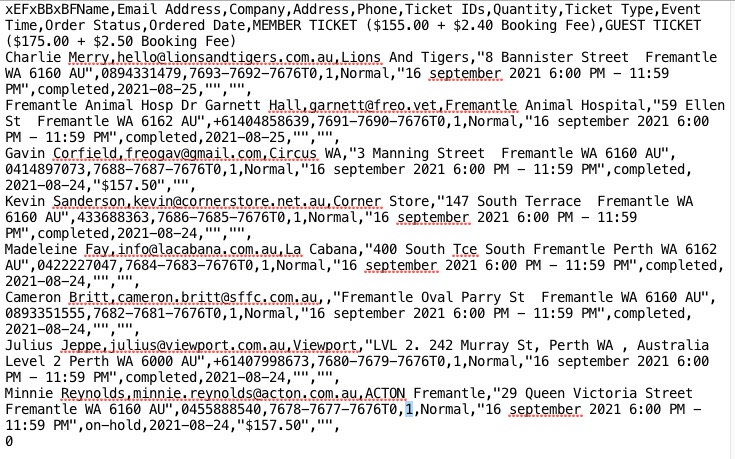
Do you have previous correct .csv file so we can check it and compare?
