Hi Ryan,
You can remove the bar and the “time until launch” using the custom CSS code below
span.evo_event_progress{display:none !important;}
Add the code in Appearance > Customize > Additional CSS
Replies for tickets on suppota
Hi Ryan,
You can remove the bar and the “time until launch” using the custom CSS code below
span.evo_event_progress{display:none !important;}
Add the code in Appearance > Customize > Additional CSS
Thanks. I now kicked out the second calendar (weekly view, both in mobile and desktop version), now there ist only the tiles-month an a view other single event-tiles. Still: Loading time is long…
Is it possible, that there are too many events in total (also past) – does this reduce the perfomance?
Hi Scott,
To enter only specific events on the slider, you can use Event type. Please take a look at this tutorial https://docs.myeventon.com/documentations/how-to-use-event-types-to-do-more/ on how you can do that. Example #3 on the tutorial will suit you better.
To center the images a bit more, please add the custom CSS code below in Appearance > Customize > Additional CSS
.evoslider.ajde_evcal_calendar.ss_imgleft .eventon_list_event.hasbgimg .evo_boxtop{flex-basis: 60%;}
Also, here https://docs.myeventon.com/documentations/how-to-install-and-use-the-event-slider-addon/ is a further tutorial on how to use the Eventon Slider, I hope it helps 🙂
Your tickets are open.
Your tickets are open.
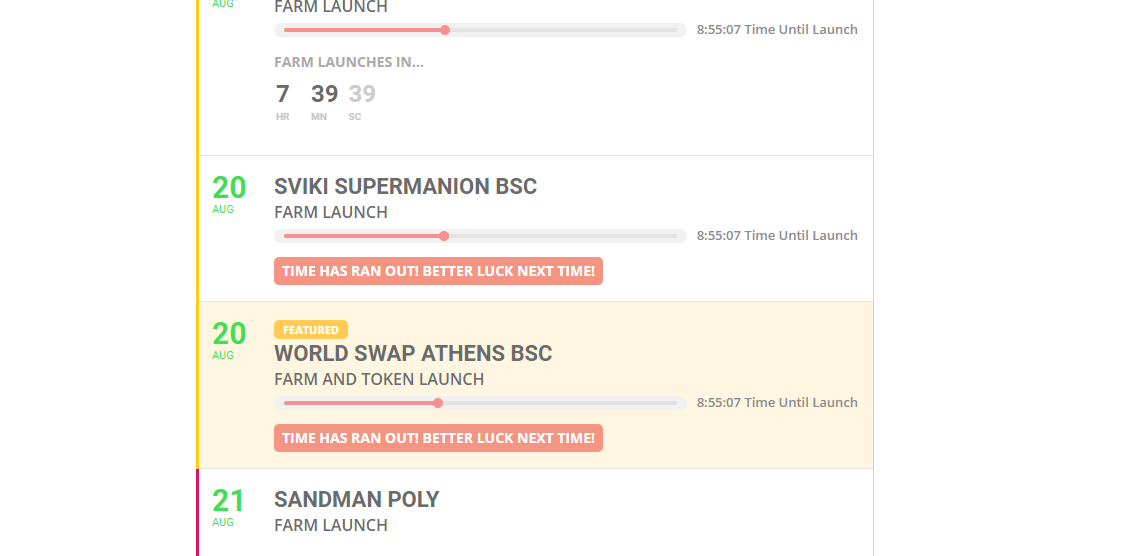
The “time until launch” is incorrect and I would like hidden. The “Farm launches in..” is correct
The problem is in
[20-Aug-2021 21:06:41 UTC] PHP Fatal error: Allowed memory size of 268435456 bytes exhausted (tried to allocate 1753088 bytes) in Unknown on line 0
Please follow this guide https://docs.myeventon.com/documentations/increasing-wordpress-memory-limit/
I haven’t touched functions.php! I update my plugins and themes from time to time as every person on this Earth running a WordPress site!
And if your script is being overwritten with every single theme update, then I understand why it keeps failing. How would you excpect it to work if it is overwritten with a theme update? It won’t work because I update things like anyone else..
Please send me the script that you have made, so I can insert it myself.