Reply to: tickets(248866)
Replies for tickets on suppota
Thank you so much. Your plugin and support are both excellent.
Hey, what’s the status on this one? The client is getting little antsy on the progress.

Ok please see if I set this up correctly now and then I will be all set! LOVE THIS PLUGIN! It’s still in draft mode until I add all of the events. I want to make sure my spreadsheet is set up to import perfectly into the plugin.
Attached is what I want it to look like when I import my CSV. I am not sure if it was set up correctly if you can log in and check (feel free to correct anything I did wrong). I am NOT adding end dates only start dates.
Below is the link to the spreadsheet. Have at it. It’s just a test sheet. If I named something wrong, feel free to change. https://docs.google.com/spreadsheets/d/1gBsb1H7WvswItGgB-M10ckHoMaMKceG40i7VdEi3OZo/edit?usp=sharing
PW y5@LgN4pq!UDz
EMAIL eventon@datagious.com
UN eventon
Thank you! So excited to add more EVENTS!!!!
Hi Jan,
Thank you for your message, I am going to assign this ticket to Ashan and he will be able to take it from here. Please allow some time for him to get back to you, we greatly appreciate your patience.
Hello,
I am referring to these fields https://docs.myeventon.com/documentations/setup-use-custom-meta-fields-events
You are welcome to create a new page and edit it with Elementor. Then you will see the error message. On the home page the plugin EventON Slider Addon also causes problems. This must also be deactivated if changes are made to the start page.
When the Eventon plug-in is active, changes to pages cannot be saved in Elementor (error 401). The error message appears directly in Elementor when a changed page is to be saved.
Hello,
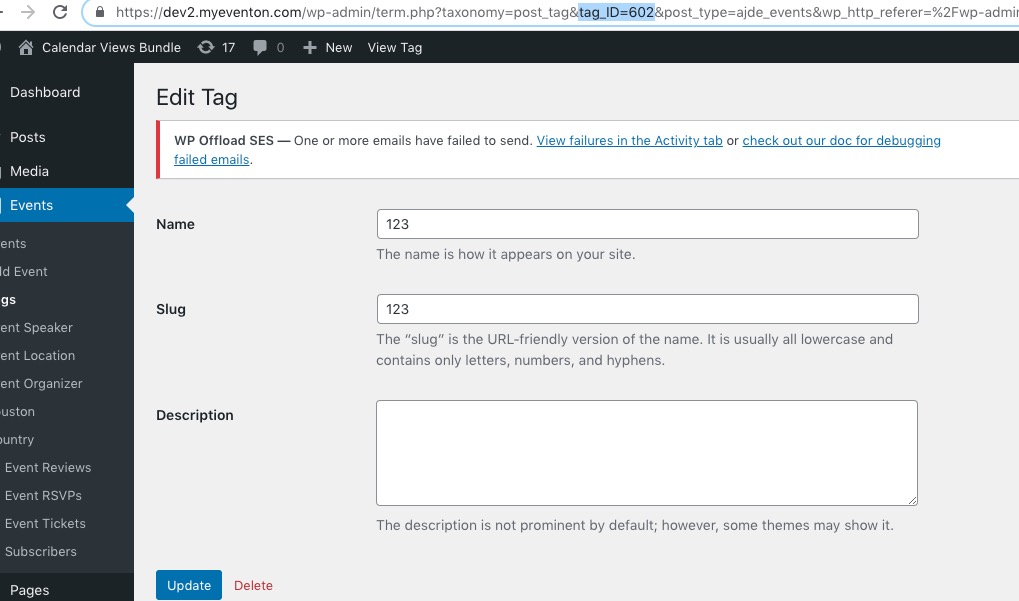
Instead of Tag name you need to use Tag ID. You can find it by going to Events > Tags > Edit > tag_ID:
Hello,
Could you update EventON to 3.1.7 and API add-on to 1.0.5?
To update eventon to latest version: If you are unable to do autoupdate, you can go to codecanyon your account > download and get the latest eventon version as zip file. Then you can go to your website, deactivate old eventon, activate (Do not delete eventon settings & data when EventON is uninstalled) from eventon settings, delete old eventon, install new one and activate. This link will further explain the process it. Also you can follow us on twitter to get real-time announcements on updates!
To update eventon addons: You can download latest eventon addons from myeventon > my account. Then you can go to your website, deactivate old addon and install new one and activate then delete the old addon. This link will further explain the process. Also you can follow us on twitter to get real-time announcements on updates!