Hey Carmen,
You can email me at basiliskan@gmail.com
Replies for tickets on suppota
Hey Carmen,
You can email me at basiliskan@gmail.com
Thank you for your understandind!
Hey Martin,
Can u please provide us admin access?
Hey Martin,
What are you using for the Translations?
Hey Antoni,
You can use cloudways.com which has a Dedicated VM that you can use
You will never get any Money back.
I have finished the work, provide me access so I can create a video. If not, I can’t do anything else.
Ideally the site owner can run this export anytime they desire to get all tickets with the information you see in the spreadsheet. The problem is the ticket “status” field (see status column in spreadsheet) is showing all tickets as “check-in” even though many of them are “checked” status.
It never used to do that, so I am guessing it was some more recent update you made to the tickets add-on or how that status field works. So I am looking to either:
a. Tell me the name of the field we should be querying to get the proper ticket status.
b. Tell me if there is an add-on for ticket reports like this (spreadsheet).
c. Or a custom quote for either a similar report export tool, or even custom function for the existing WP ALL EXPORT we have been using so it properly pulls that field.
Hello,
Here is a tutorial on how you can change the event slug
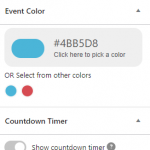
Regarding changing event top colors, you can do that from the single event settings (see image below)
Regarding the options to switch from standard row views to tile view, you can do that when generating your short code. You can generate your short code by going to myEventON > Settings > Shortcode generator.
Hi Benny,
Here is a tutorial on how you can add social media share icons.
Ok !!!!!