Does the table style view not for you? https://addons.myeventon.com/weeklyview/
are you wanting the weeklyview addon order refunded?
Replies for tickets on suppota
Does the table style view not for you? https://addons.myeventon.com/weeklyview/
are you wanting the weeklyview addon order refunded?
I checked with my hosting company, and they say the issue is with the website, not on their end.
Or at least I installed the most recent one from EventON. I deactivated/delete the plugin and then uploaded the new files via FTP. The file I used is named “eventon-tickets_1.9.5.zip”, however when I check the version number in my admin dashboard the version still shows as 1.9.4.
I’ve already updated Tickets to 1.9.5…
that did the trick thanks so much ashan!
Sara I see what is going on, at the latest version of RSVP addon theadmin notification will only have a link to download the file. I can see how an actual attachment in the email would be useful. We will make this possible in the future updates to RSVP addon. Currently it is not a supported feature.
If a customization was done to assist this you would need to contact the person who did the customization to request help with that.
please update to RSVP invitee version 0.5 https://docs.myeventon.com/documentations/changelog-for-rsvp-events-invitees/ should resolve that issue 🙂
We are very sorry for the inconvenience. Could you please update Tickets to 1.9.5?
To update eventon addons: You can download latest eventon addons from myeventon > my account. Then you can go to your website, deactivate old addon and install new one and activate then delete the old addon. This link will further explain the process. Also you can follow us on twitter to get real-time announcements on updates!
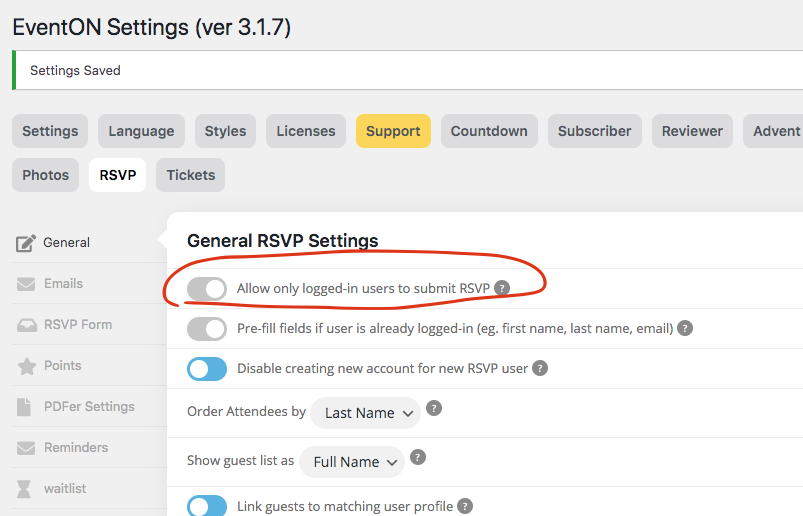
Image again
if this is set to yes.
Then you will see you do not have permission message.