We are glad your issue is resolved, if you have any further questions or concerns please create a new ticket.
If you have a moment, we would greatly appreciate if you could kindly leave us a review at codecanyon! from your account > downloads. Cheers!
Hello,
Please add this CSS code to EventON > Styles (If you don’t see any change, EventON > Scripts & Styling > turn off Write styles to header > save settings > turn on Write styles to header):
.ajde_evcal_calendar.boxy .evcal_list_a span.evcal_event_types.ett2, .ajde_evcal_calendar.boxy .evcal_list_a span.evcal_event_types.ett3, .ajde_evcal_calendar.boxy .evcal_list_a span.evcal_event_types.ett4, .ajde_evcal_calendar.boxy .evcal_list_a span.evcal_event_types.ett5 { display: block !important }
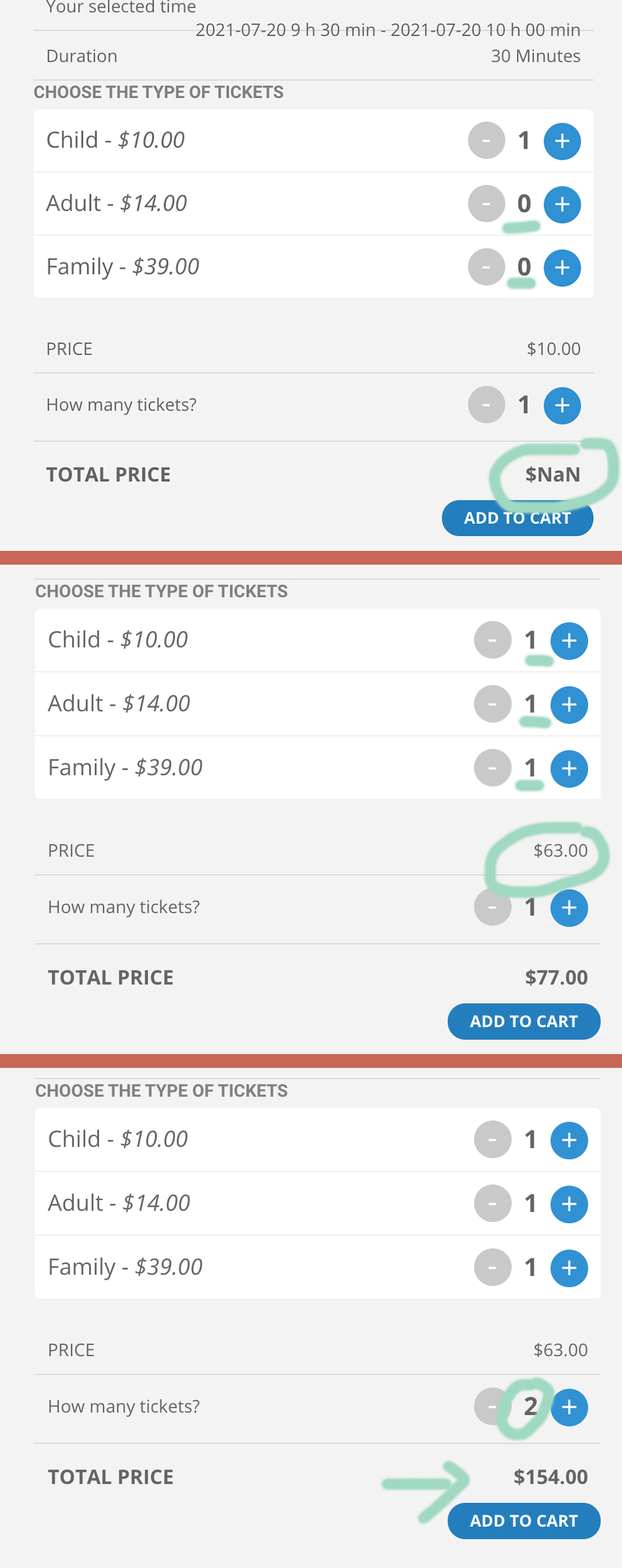
Hey there,
It’s not what I asked 😀 I know that we can use this way to sell tickets but people won’t really understand that they need to chose the type of tickets then add the number of tickets of that type. Then they have to choose another type and do it again for each type of tickets and amount they need.
It would be way easier to have 3 options with the + & – buttons like in my screenshot.
I tried the option “Sell Variations as separate ticket (Only when you have single variation type)” but it does not work same with this one: “Sell Price Options as Separate Tickets”
I tried both but it’s not working. And I also got a problem when I set the variation as separate tickets. I got a ‘NAN’ price when the 3 options are not set to 1.
And finally it’s not really clear that you are buying a tickets and add other child or adults.
I hope it’s clear, sorry for my english 🙂
Thanks for your help !
WooCommerce handles taxes and EventON just applies them to the ticket price. More info on Woo’s Tax: https://docs.woocommerce.com/document/setting-up-taxes-in-woocommerce/
Unfortunately, it seems that the way you use EventON and WooCommerce the only way is to reassign the image manually.
Ashan,
Could you check Reply to: 245451?
Do we have a solution for this? Or we don’t need to do anything here because Google does it on their side?
Hello Monika Baldrian,
You can deactivate Google Map API by going to EventON Settings > Google Maps API > disable Disable Google Maps API.
I am also going to assign this ticket to Ashan and he will be able to take it from here and answer your question. Please allow some time for him to get back to you, we greatly appreciate your patience and thank you for being a eventon customer!
Hi there,
is there any news regarding the missing possibility to make Google Maps in EventON GDPR-compliant? This is a huge issue for all EU websites. If not, du you have any plans to include this in a future update?
When I install a plugin that manages cookies on the website (e.g. Borlabs Cookie), it is only possible to deactivate all of EventON functions currently, but not separately Google Maps.
Thanks for the info!
Yes it is the code i had in functions.php why ?
Hello,
Thank you for your suggestions and background info.
– There is at least one case which makes me act in the woocommerce product area:
assigning specific VAT for tickets.
e.g. 5% VAT, which is necessary specifically for those tickets.
(Other products need to be assigned 20% VAT etc.) .
Is there a different way to assign specific VAT to tickets (as a product)?
Notice: we have to display VAT in the cart and checkout workflow.
Thank you for your efforts and help in advance.
Kind regards,
Johannes
Hi, thank you so much for looking at this. The event I referred to had expired (Uni Review), but I set it live again so you can see. Since I am still building the site (as you can probably see :)), feel free to create new events if you want to test something, this site is not yet really live. Chris