I did both but the issue still appears.
Can you please use the information I provided (login credentials) and observe the issue?
Maybe you can observe the solution – and you have my acceptance to fix it.
Archives: Replies
Replies for tickets on suppota
Reply to: tickets(234094)
It has been 2 months since you last reply. Please update to version 1.9.4 of tickets addon and that will resolve this issue.
Reply to: tickets(243448)
Ryan, it is VERY IMPORTANT!!! NOT to delete repeat instances after customers have purchased tickets on it. Because the repeat event data are stored in multi dimensional array with key association and deleting any would jump others to its place and would alter the time of the event time.
Reply to: tickets(243797)
I have gone ahead and refunded you for all of those. If you have a moment, we would greatly appreciate if you could kindly leave us a review at codecanyon! from your account > downloads. Cheers!
Reply to: tickets(237205)
Soibhan we are going to do more testing on this. As we are not able to replicate the issue on our end. but only happen in your website.
Reply to: tickets(234244)
Hello there jennifer as you can see from the assign event tooltip.
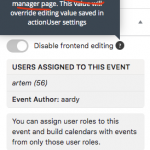
Assigning the user would have an impact on frontend Event Manager. Assigned users should be able to go to front end event manager and edit events from there.
https://docs.myeventon.com/documentations/how-to-set-up-front-end-event-manager-for-users/
Reply to: tickets(243750)
Javid, thank you for your honest message and letting me know how you felt. We truly value your business and using eventON products since 2018! I would also like to note, that you can use that coupon multiple times in the future to get more discounts.
Reply to: tickets(243930)
please update to actionUser 2.2.6 where we have fixed the issue
https://docs.myeventon.com/documentations/au-changelog/
Reply to: tickets(241167)
Sorry for not getting back in here sooner. I see what is going on. The Woocommerce based variable product is not 100% compatible when duplicating via events.
What you can do is this to fix it.
After duplicate. Event Tickets meta box > Further edit button click that. and enable virtual in variations.

this seemed to resolve the issue on our end.
Reply to: tickets(242101)
Hello steffen, i think the issue here is the scanner you are using which may be converting special characters into different entities. Have you tried an iPhone based scanner? — we have not heard of this issue from any of our other customers who are also using the QR code addon.